When onboarding/adding a new Odoo portal the following information needs to be provided and verified.
TO BE PROVIDED
Fields that are required to establish and validate the connection with the Odoo portal: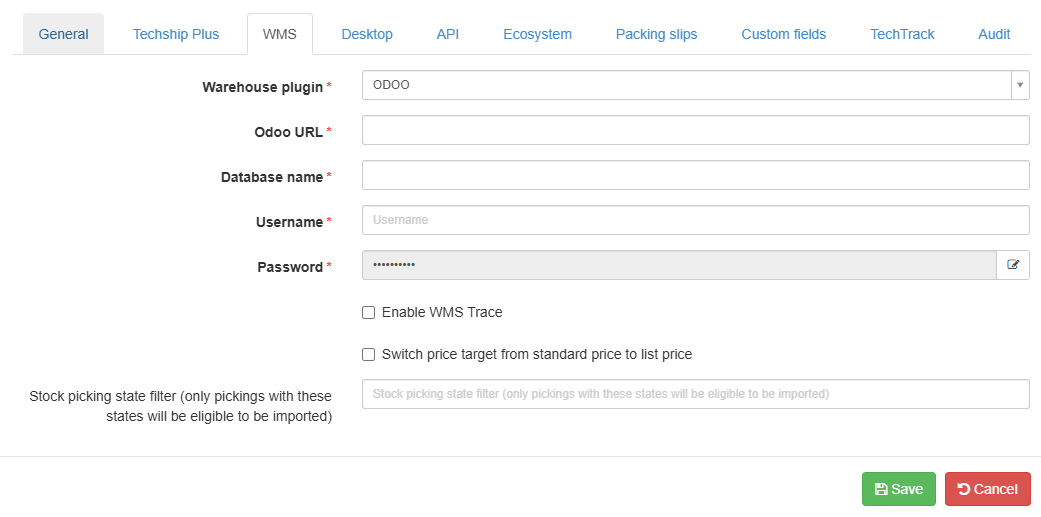
- Warehouse plugin: System pre-defined value.
- Odoo URL: Used to reach the URL of the Odoo instance.
- Database Name: Used to indicate which database should be targeted within the ones set up in Odoo:
- Username / Password: Authentication parameters.
ADDITIONAL ELEMENTS (OPTIONAL)
Optional fields that define pricing behavior and order eligibility during Odoo imports.
- Switch price target from standard price to list price. If selected, the unit price from the lines imported from Odoo will be the list price (retail price).
- Stock picking state filter (only pickings with these states will be eligible to be imported)
You can decide whether to filter order imports by any order status by including one or more (for example: cancel, ready, or done). Include the states you need to import separated by commas, and hit Save. Once this field is loaded, when you import, all other statuses will be excluded. Clear the statuses and Save again to remove the filter.
 WARNING: Before importing any type of order, go to Maintenance --> Clients, select the client and make sure the client Code is set to be DEFAULT, as it will only import to the client associated with that code.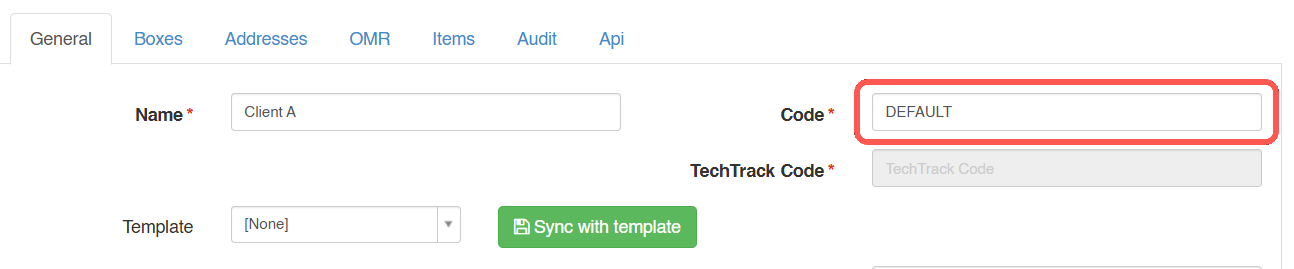
WARNING: Only products containing length, width, height and weight details are eligible to Sync WMS Items into techSHIP. Check this article to learn more about this option:
How to use Items for Cartonization [Step-by-step guide]
 WARNING: Odoo has a direct dependency on Service Code Mappings in order to update the selected Carrier back to Odoo. The following fields are required in the Service Code Mappings configuration:
External Service Code
This value will be updated back as the Service Code.
- External SCAC Code
This value is used to look up the Carrier in Odoo by name.
WARNING: Any missing or non-validated, incorrect setup or information will delay the setup process.
Was this article helpful?
That’s Great!
Thank you for your feedback
Sorry! We couldn't be helpful
Thank you for your feedback
Feedback sent
We appreciate your effort and will try to fix the article