This article describes the requirements for the techSHIP Acumatica (v23) plugin setup.
As an onboarding document, it intentionally focuses on requirements and prerequisites. Detailed API behavior or specifics are handled by our specialists during implementation, and are outside the scope of this article.
 NOTE: This article is for the Acumatica v23 plugin only. For the deprecated plugin version, see: Acumatica - Onboarding Requirements [Information].
 WARNING: Most techSHIP–Acumatica integration issues originate from incomplete or incorrectly configured Acumatica REST endpoints. The custom Acumatica endpoints must be fully configured, validated, and tested before starting the techSHIP configuration. Credentials alone are not sufficient.
This article is divided into the following sections:
- Acumatica endpoint requirements
- Default vs. Custom Endpoints
- Required Endpoint Entities & Capabilities
- Default vs. Custom Endpoints
Other Considerations
- UPC Handling (Optional)
- ShipVia Usage & Critical Mappings
- Retrying Failed Acumatica Updates
- UPC Handling (Optional)
Configuring Plugin Parameters
- Required
- Optional
I. ACUMATICA ENDPOINT REQUIREMENTS
i. Default vs. Custom Endpoints
Acumatica provides default REST endpoints (e.g. Default/23.200.001) exposing standard entities.
For techSHIP integrations, we recommend using a dedicated custom endpoint created by cloning a default endpoint and:
Including only the entities required by techSHIP
Exposing required child collections and actions
Exposing any custom fields needed for the project
The Acumatica customer (or their implementation partner) is responsible for creating, configuring, and validating the custom REST endpoint, including:
- Cloning a default endpoint
- Exposing all required entities, child collections, and actions
- Ensuring required fields are editable
- Providing endpoint details and credentials to techSHIP
 WARNING: Failure to complete these steps will block onboarding and delay go-live.
ii. Required Endpoint Entities & Capabilities
The custom endpoint (e.g. TechshipExt/23.200.001) must expose at minimum:
Entities
SalesOrder
Shipment
StockItem
ShippingBox
Child collections
Child collections must be exposed via $expand to allow techSHIP to retrieve all required shipment and order data in a single request. This avoids partial data retrieval and prevents downstream processing errors. Typical child collections include:Order and shipment lines
Allocations
Packages and package contents
Shipping settings and ship-to information
Confirm Shipment action
ConfirmShipment must be enabled on the Shipment entity in the custom Acumatica endpoint to allow techSHIP to confirm shipments in Acumatica after labels and tracking numbers have been generated.
- Shipment updates
The shipment entity must be updatable (PUT enabled) in the custom Acumatica endpoint.
techSHIP uses this capability to push shipment-related updates back into Acumatica before or during shipment confirmation, including:
- Tracking numbers
- Carrier and service selection
- Package details (box, weight, dimensions)
- Freight charges and integration-specific fields
- Persist tracking numbers and shipment-related data returned by techSHIP in Acumatica
All fields updated by techSHIP must be:
- Exposed in the endpoint
- Marked as editable
- Compatible with any custom validation or workflow logic
II. OTHER CONSIDERATIONS
This section outlines additional configuration considerations, including critical warnings and related behaviors, that directly impact shipment processing in techSHIP.
WARNING: Packing behavior depends on where packaging is performed:Packing in techSHIP
Imported shipments must not contain packages in Acumatica.
- Packing in Acumatica
Shipments may include packages and contents, which are transferred to techSHIP.
i. UPC Handling (Optional)
If enabled and properly configured, techSHIP can retrieve UPC values from Acumatica StockItem data during item synchronization. UPC values are sourced from standard StockItem cross-reference information. The following reference tags may be considered when present and properly configured in Acumatica:
- UPC
- GTIN/EAN/UPC/ISBN
NOTE: The exact behavior depends on the Acumatica endpoint configuration and data quality. Please note that UPC retrieval will occur only after the corresponding setup has been completed and validated.
ii. ShipVia Usage & Critical Mappings
The ShipVia field in Acumatica is a critical control point for shipments imported into techSHIP.
Depending on configuration, ShipVia can be used to:
Select a Billing Account, or
Select a Carrier and Service
Only one method is applied per shipment.
ShipVia Billing Account: If a BillingAccount or BillingAccountClient in techSHIP has a value matching the Acumatica ShipVia, that billing account is automatically selected during import.
ShipVia Carrier & Service: If a Service Code Mapping exists where External Code=ShipVia, techSHIP selects the mapped carrier and service. In this case, the default billing account is used.
NOTE: For more information about Service Code Mapping, please see: Best Practices for Carrier and Service Code Mappings setup [Information].
iii. Retrying Failed Acumatica Updates
If an update to Acumatica fails, techSHIP retries it automatically for approximately three days, using increasing intervals of up to one hour.
If the update is still unsuccessful after the automatic retry period, retry it manually from the individual order or the corresponding manifest.
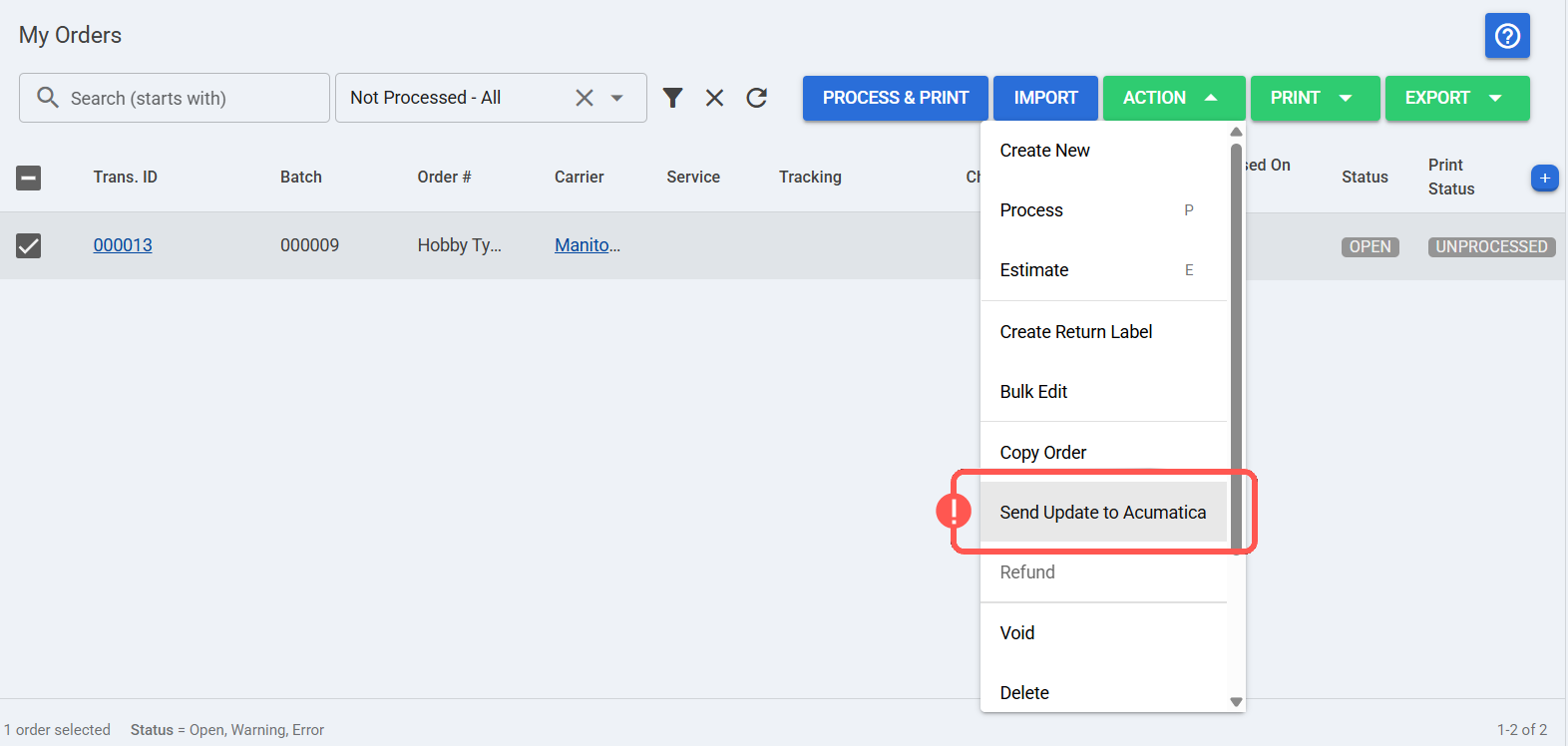
Individual order: Select the order, click Action, and select Send Update to Acumatica.
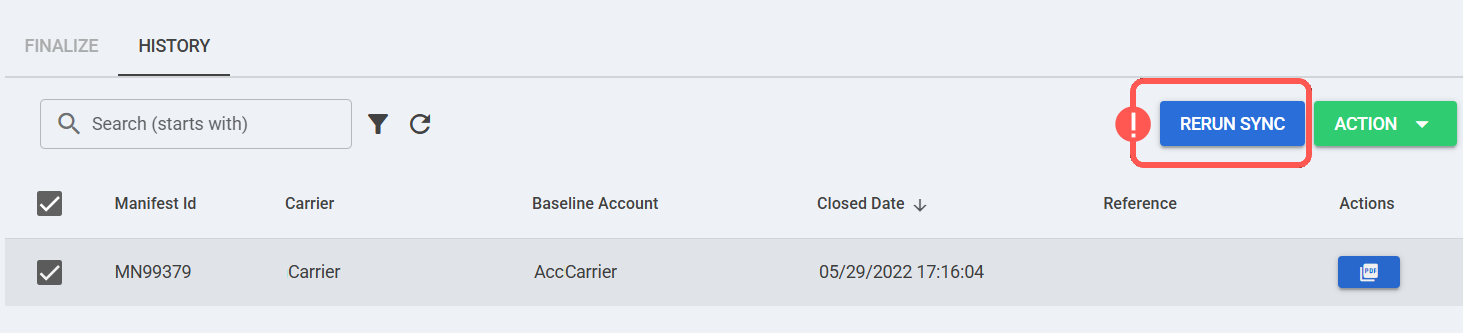
Manifest: Access Carriers > Manifests > History, select the manifest, and click RERUN SYNC.
III. CONFIGURING PLUGIN PARAMETERS
i. Required
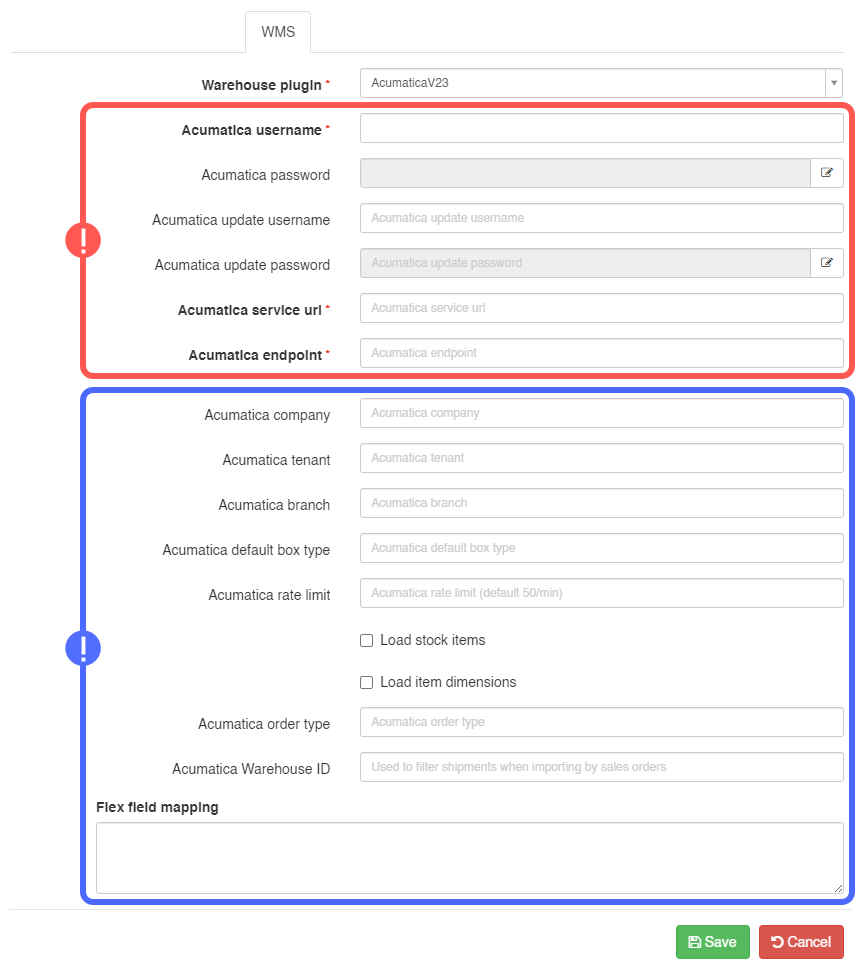
When onboarding or adding a new Acumatica portal, you must provide and verify the following information (highlighted in red in the plugin configuration screenshot):
- Acumatica username
- Acumatica password
- Acumatica update username
- Acumatica update password
- Acumatica service URL
- Acumatica endpointNOTE: The Acumatica REST endpoint used by techSHIP must follow this format:
https://<acumatica-site>/entity/<EndpointName>/<Version>/
Example: https://acumatica.example.com/entity/Techship/23.200.001/WARNING: The techSHIP-Acumatica integration is currently tested and validated up to Acumatica version 23.200.001(Typically, Techship/[AcumaticaVersion]). Custom endpoints must be created against this version to ensure compatibility.
ii. Optional
The following parameters are optional (highlighted in blue in the plugin configuration screenshot):
Acumatica Company
Acumatica Tenant
Acumatica Branch
Acumatica default box type (e.g., SINGLE)
Acumatica Rate Limit
NOTE: The Acumatica Rate Limit field is based on the order volume. You should verify with the development or implementation team to confirm whether this needs to be completed or modified.Load Stock Items: Optional configuration that allows techSHIP to retrieve item-level data from Acumatica StockItem entities, depending on customer setup
Load item dimensions: If enabled, techSHIP loads height, length, width, and weight from Acumatica StockItems
Acumatica Order Type: If specified, techSHIP imports only the configured order types
Acumatica Warehouse ID: Used to filter shipments when importing by sales orders
Flex Field Mapping: Allows binding custom fields in addition to the standard plugin bindings
Was this article helpful?
That’s Great!
Thank you for your feedback
Sorry! We couldn't be helpful
Thank you for your feedback
Feedback sent
We appreciate your effort and will try to fix the article