![Article 1: Shippiz Onboarding Requirements and Configuration Guides [Information]](https://s3.amazonaws.com/cdn.freshdesk.com/data/helpdesk/attachments/production/96804815/original/09VBUo14zVrZ7P3XOYSoWXIqqrVjGFCUUQ.png?1779474501) | ![Article 2: Reference Data: Shippiz Baseline Account Fields [Guide]](https://s3.amazonaws.com/cdn.freshdesk.com/data/helpdesk/attachments/production/96804740/original/A-sKSzmZ_Vj4x4q6VoUBEk-gtdTDnv2kuQ.png?1779473989) | ![Article 3: Reference Data: Shippiz Client (Billing) Account Fields [Guide]](https://s3.amazonaws.com/cdn.freshdesk.com/data/helpdesk/attachments/production/96805395/original/_J10u70kSFBTHPSpib4jtXfeu4C3mm54wg.png?1779476680) | ![Article 4: Reference Data: Order-Level Shippiz Fields [Guide]](https://s3.amazonaws.com/cdn.freshdesk.com/data/helpdesk/attachments/production/96804746/original/nvzXhnphxceM2NVyNNdVUi_M73glJphvXw.png?1779474008) |
| Onboarding and Configuration | Baseline Account | (Billing) Account | Order-Level Fields |
 You are here You are here |
This reference lists the carrier-specific Shippiz Client (Billing) Account fields used in techSHIP.
Use it together with the linked Client (Billing) Account setup steps: the setup guide covers the shared configuration flow, while this article defines the confirmed field values, field behavior, and client-specific carrier configuration details.
 |
For a complete overview of supported carriers and related setup guides, refer to techSHIP supported Carriers - Master List [Guides List].
|
 | Review and complete Reference Data: Shippiz Baseline Account Fields [Guide] before configuring the Client (Billing) Account so the carrier connection is available.
|
TABLE OF CONTENTS
Adding a Client (Billing) Account
Follow the UI Navigation steps in How to Add a Carrier Billing Account [Step-by-Step guide], using the carrier-specific values provided in this guide.
Carrier-Specific Instructions
The Carrier tab contains the Client (Billing) Account fields used to define confirmed carrier-specific behavior for this client. Highlighted fields indicate mandatory and optional configuration groups.
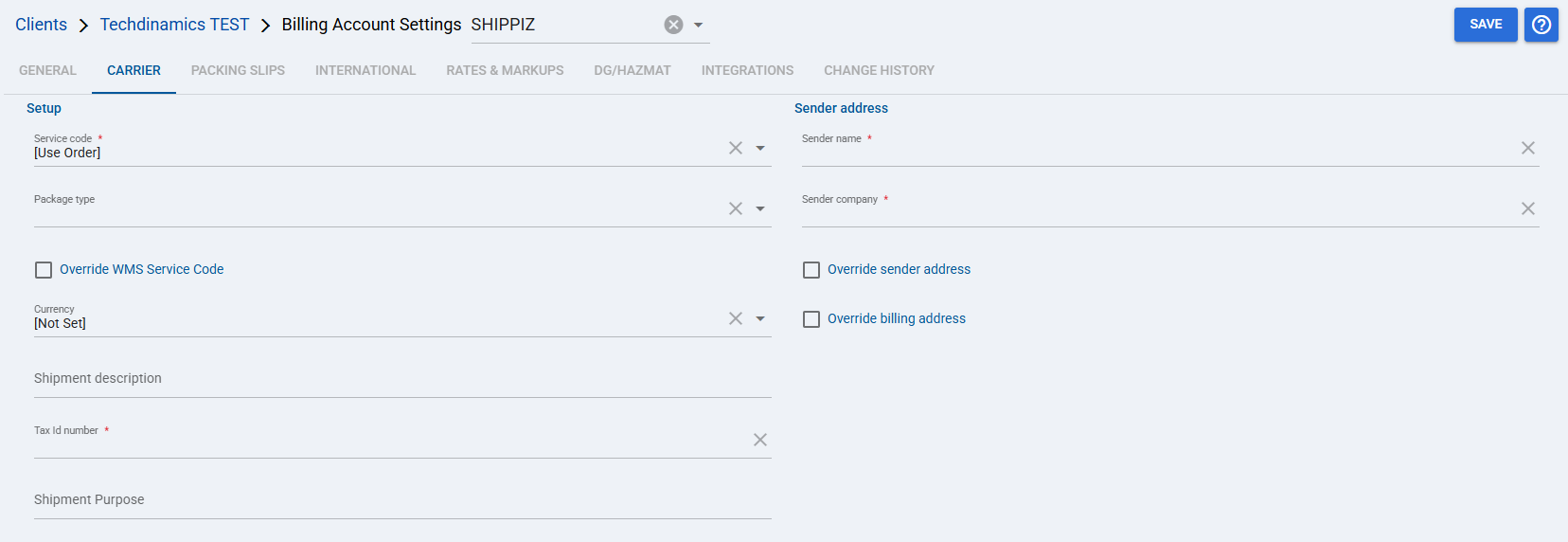
 | Service code: Defines the default Shippiz service code used by the Client (Billing) Account. When set to [Use Order], the service value is taken from the selected order during shipment processing. |
 | Package type: Defines the package type used for shipments processed with this Client (Billing) Account. |
 | Override WMS Service Code: Allows the Client (Billing) Account service code to override the WMS service code when processing shipments. |
 | Currency: Defines the currency used when rating and processing shipments with this Client (Billing) Account. |
 | Shipment description: Defines the shipment description used for shipments processed with this Client (Billing) Account. |
 | Tax Id number: Defines the tax identifier sent with shipments processed with this Client (Billing) Account. |
 | Shipment Purpose: Defines the shipment purpose value used for shipments processed with this Client (Billing) Account. |
 | Sender name: Defines the sender contact name sent for shipments processed with this Client (Billing) Account. |
 | Sender company: Defines the sender company name sent for shipments processed with this Client (Billing) Account. |
 | Override sender address: Allows the configured sender address override to be used for shipments processed with this Client (Billing) Account. |
 | Override billing address: Allows the configured billing address override to be used for shipments processed with this Client (Billing) Account. |
| Select Save before continuing so the configured settings are applied.
|
Next Steps (Optional)
Optionally, after the Client (Billing) Account is configured and saved, continue with Reference Data: Order-Level Shippiz Fields [Guide].
Was this article helpful?
That’s Great!
Thank you for your feedback
Sorry! We couldn't be helpful
Thank you for your feedback
Feedback sent
We appreciate your effort and will try to fix the article