Order Management Rule (OMR) triggers define the exact chronological moment in the processing lifecycle when your custom automation logic executes. Understanding this sequence ensures you apply your business rules at the optimal stage to effectively manipulate orders within techSHIP.
This article explains the chronological OMR lifecycle execution points, details the exact sequence of available triggers, and outlines the corresponding error handling logic.
Prefer listening? This podcast-style audio walks you through the article's key points.
 | AI-Assisted & Human-Reviewed: For general information only. Please double-check important details. | |
| | ||
| For a broader overview of the OMR engine and general rule configuration instructions, refer to What's New in Order Management Rules (OMR) for Rule Sets in techSHIP [Guide]. To learn more about the available order statuses, see: Understanding Order Statuses [Information]. | |
| | ||
TABLE OF CONTENTS
Trigger Execution Sequence
The platform evaluates rules sequentially based on the order's progression:
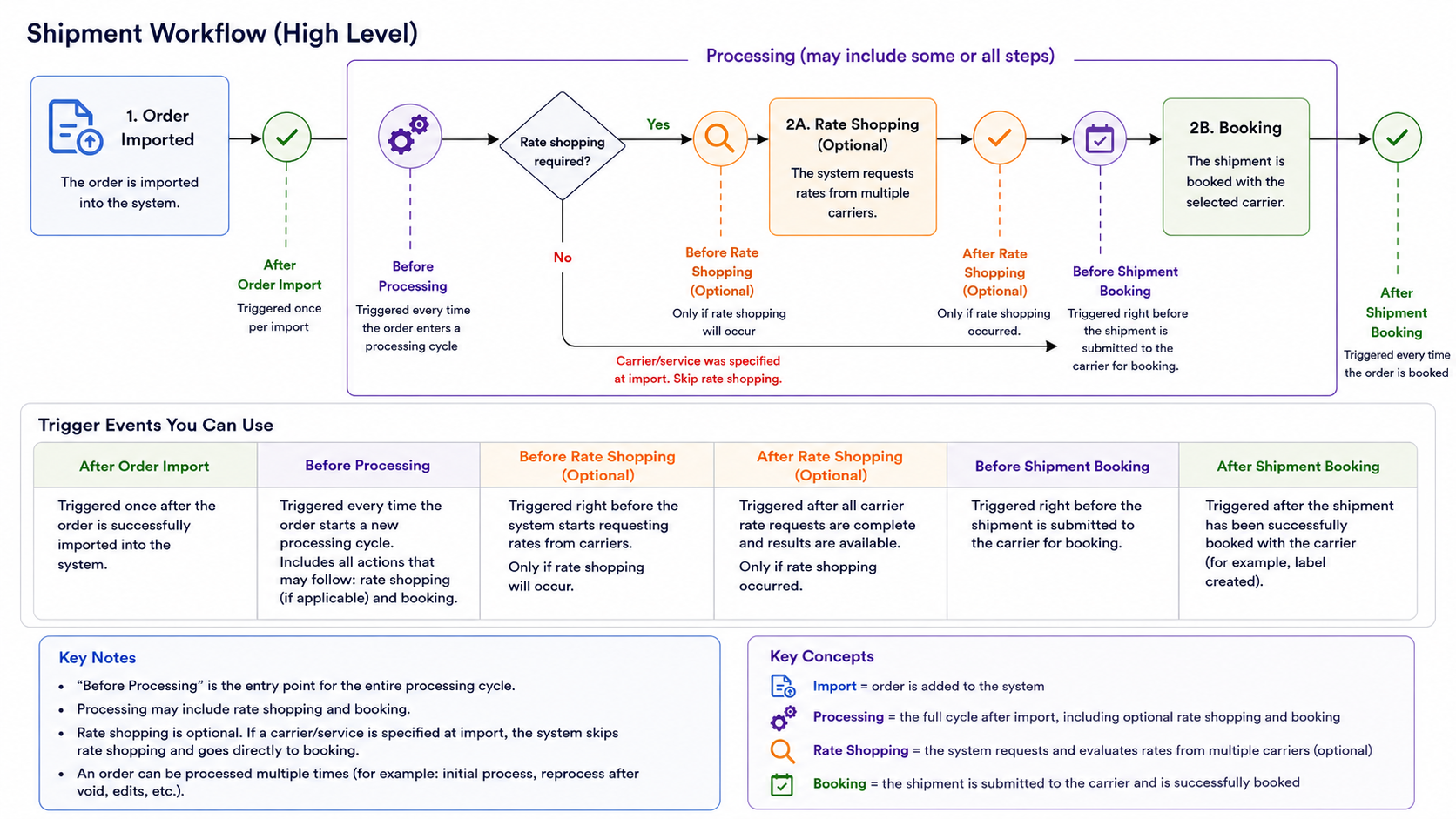
The table below outlines the Trigger points available during the OMR lifecycle:
# | TRIGGER | DESCRIPTION |
1 | After Order Import | Triggered once after the order is successfully imported from the Host System. |
2 | Before Processing | Triggered every time the order starts a new processing cycle within the OMR. |
3 | Before Rate Shopping | Triggered right before requesting rates. This evaluates per Carrier, meaning it can run multiple times if you are shopping multiple carriers. You must explicitly select a Carrier code, and the rule's actions are only permanently applied to the order if that specific carrier wins the rate shop. |
4 | After Rate Shopping | Runs after the platform selects the winning rate. This only fires if Rate Shopping actually occurs; if skipped, this trigger is completely ignored. |
5 | Before Shipment Booking | Runs immediately before the shipment data is submitted to the Carrier. |
6 | After Shipment Booking | Runs immediately after the shipment booking process completes successfully through techSHIP. |
| For the Before Shipment Booking trigger, if a Carrier is explicitly selected on the order prior to processing, the rule will still execute, but it naturally skips the rate shop evaluation phase. | |
| | ||
Error Handling Business Logic
When an exception is thrown during rule execution, the system responds dynamically based on the specific Trigger stage where the failure occurred.
Exceptions raised at the After Rate Shopping stage immediately stop the processing workflow and mark the order status as Failed.
Conversely, exceptions triggered at the After Shipment Booking stage follow the standard post-booking failure path, initiating the normal void and cleanup procedures for the affected Shipment to ensure data integrity.
Was this article helpful?
That’s Great!
Thank you for your feedback
Sorry! We couldn't be helpful
Thank you for your feedback
Feedback sent
We appreciate your effort and will try to fix the article