The Summary Profitability Report dashboard provides a detailed financial analysis of your fulfillment operations. It helps you monitor revenue, costs, and margins to identify profitable trends and areas for optimization.
This article explains the data displayed on the dashboard and how to interpret its key metrics.
 |
For a list of available dashboards and instructions to access them, see Insights Dashboards Master List [Guides List]. To learn how to filter, view details, and export data from this dashboard, refer to: How to Use the Insights Dashboards [Guide].
|
TABLE OF CONTENTS
Purpose
Use this dashboard for financial health monitoring and strategic decision-making by:
Tracking revenue and profit margins over specific time periods.
Analyzing the impact of shipping costs on your bottom line (Contribution Margin).
Monitoring the aggregate financial performance of your operations.
Identifying trends in order volume versus shipment volume.
The table below summarizes its key aspects:
FEATURE | SHIPMENT PERFORMANCE |
| Primary Focus | Financial performance and profitability analysis. |
| Best For | High-level financial reviews, monitoring profit trends, and tracking revenue versus costs. |
| Highlighted Metrics |
|
| Typical Questions |
|
| Typical Users |
|
Components
Key components:
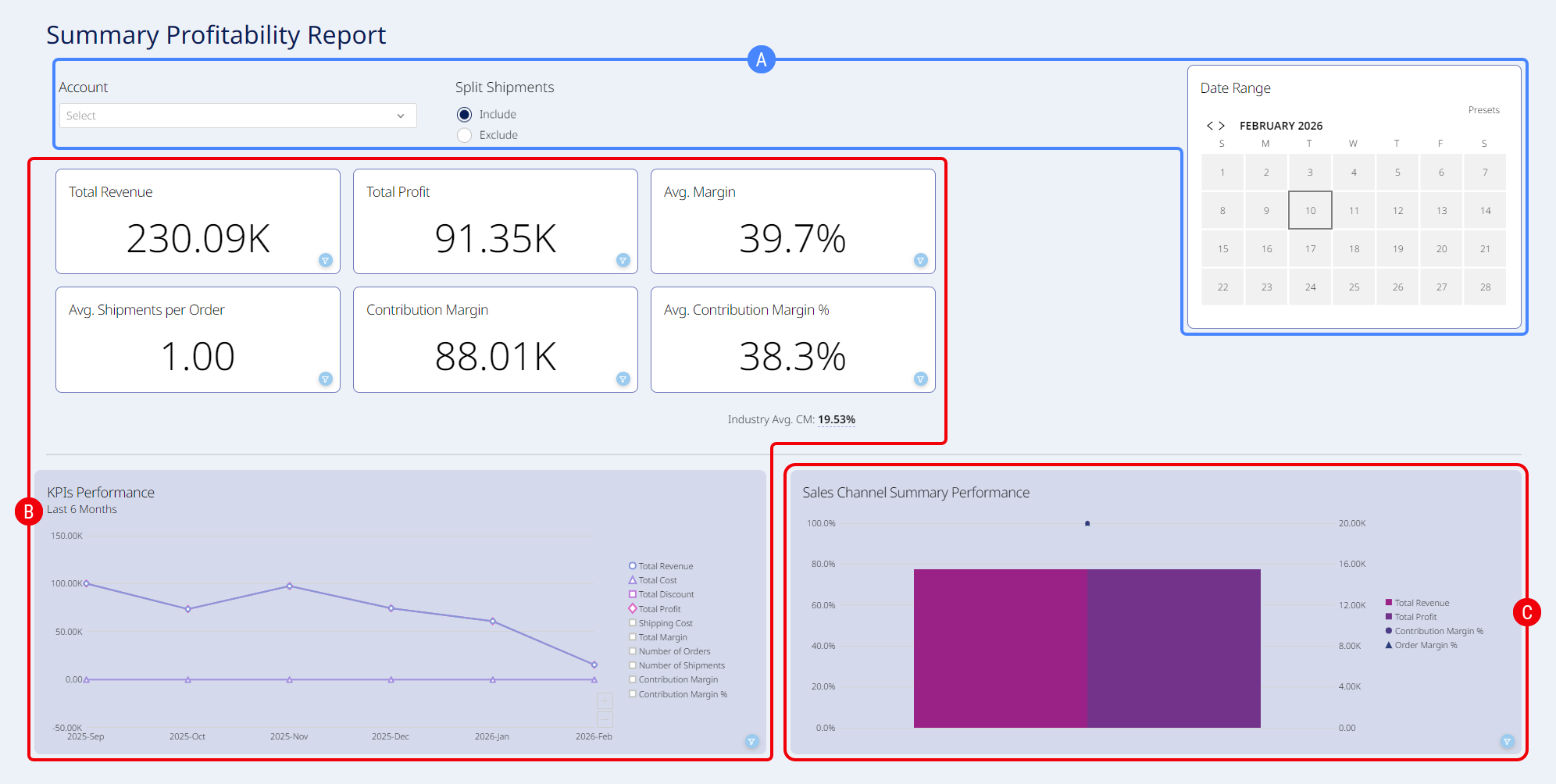
 | Embedded Filters: Filter by Account, Shipment Splitting, Date Range, or a combination. |
 | Profitability Overview: Provides high-level Key Performance Indicators (KPIs) and a trend chart to visualize financial health. This section includes: |
- KPI Cards:
The Industry Avg. CM metric displayed beneath the contribution margin tile represents the global aggregate data across all active techOMS accounts. This benchmark calculates data over a rolling 90-day period and strictly excludes orders with missing or zero shipping costs. - Total Revenue: The total income generated from orders within the selected period.
- Total Profit: The total revenue minus product costs and discounts.
- Avg. Margin: The gross profit expressed as a percentage of total revenue.
- Avg. Shipments per Order: The average number of shipments required to fulfill a single order (indicates split shipment frequency).
- Contribution Margin: The net value remaining after deducting product costs, discounts, and shipping costs from the revenue.
- Avg. Contribution Margin %: The contribution margin expressed as a percentage of total revenue. This tile also displays the Industry Avg. CM.
- KPIs Performance Chart: A combination chart that visualizes the trajectory of your financial metrics over time. It allows you to correlate volume (Number of Orders, Number of Shipments) with financial outcomes (Total Revenue, Total Profit, Shipping Cost).
 | Sales Channel Summary Performance Chart: Displays the combined results of your sales operations. It compares key financial metrics side-by-side to show overall health: |
Total Revenue: The overall revenue generated.
Total Profit: The overall profit realized.
Contribution Margin %: The aggregate profitability percentage after accounting for shipping costs.
Order Margin %: The aggregate gross margin percentage.
Was this article helpful?
That’s Great!
Thank you for your feedback
Sorry! We couldn't be helpful
Thank you for your feedback
Feedback sent
We appreciate your effort and will try to fix the article