The Cartonization by Box Tag feature allows you to filter the available packaging options dynamically during the cartonization process using custom tags. By applying tags to specific boxes, you can ensure techSHIP selects only the most appropriate packaging for specialized orders.
This guide covers how to configure the Order Management Rules (OMR) engine to restrict cartonization to specific tagged boxes, including a practical use case.
TABLE OF CONTENTS
- Understanding Tag Logic and Fallbacks
- Configuring the Cartonize Action
- Business Use Case: Frozen Food and DTC Fulfillment
Understanding Tag Logic and Fallbacks
When you select multiple tags in the Cartonize action (e.g., Fragile and Heavy), the system will only select from predefined boxes that possess all of those exact tags. Any candidate boxes with partial matches are automatically excluded from the evaluation. This strict filtering is driven by an underlying AND Logic rule.
If the Tags field is left completely empty in your rule configuration, the system ignores tag filtering entirely. In this Fallback Logic scenario, the cartonization engine evaluates all available predefined boxes for the client, preserving the standard default behavior.
Configuring the Cartonize Action
To use the tag filtering feature, you must assign the desired tags directly to the Cartonize action within your rule set.
 | To learn how to build and configure an OMR, refer to What's New in Order Management Rules (OMR) for Rule Sets in techSHIP [Guide]. | |
| | ||
 | To successfully filter candidate boxes, you must first ensure that your predefined boxes have tags assigned to them. For instructions on how to create and assign tags to your Client's Boxes, refer to How to Manage Box Tags [Step-by-Step Guide]. | |
| | ||
When you are ready to configure the specific tag-restricted action, proceed as follows:
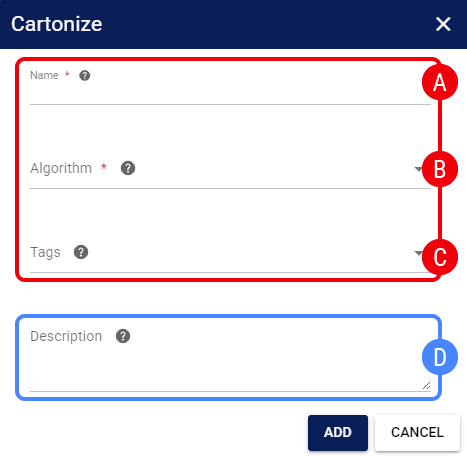
 | Name: Enter a descriptive name for the action. |
 | Algorithm: Select the logic engine used to determine the most efficient box. |
| To learn about each available Cartonization algorithm, refer to Understanding Cartonization Algorithms [Information]. | |
| | ||
 | Tags: Select one or multiple tags to restrict the eligible box selection. |
 | Description: (Optional) Provide details about the action's purpose. |
Once saved, the rule will dynamically filter the candidate boxes during cartonization for all applicable orders based on your decision tree.
Business Use Case: Frozen Food and DTC Fulfillment
This feature can be adapted to many different operational needs. As a practical example, when shipping perishable goods directly to consumers in the DTC space, you might have specific orders that require strict temperature control.
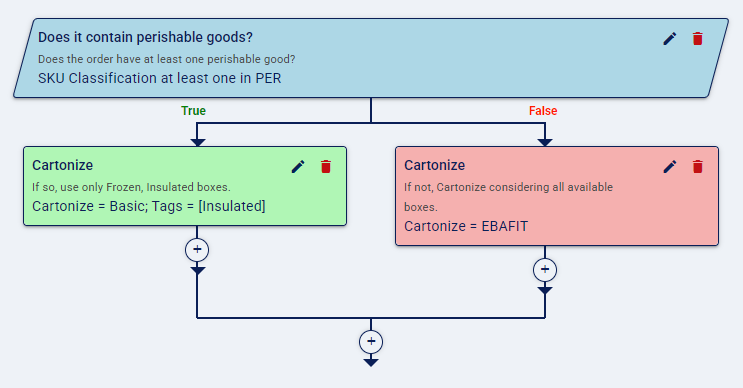
You can build an Order Management Rule (OMR) that checks if the order contains perishable items, and if true, triggers a Cartonize action restricted exclusively to boxes tagged as Insulated.
This guarantees that standard, non-insulated boxes are never selected for these sensitive shipments, ensuring product integrity while fully automating the techSHIP cartonization workflow.
Was this article helpful?
That’s Great!
Thank you for your feedback
Sorry! We couldn't be helpful
Thank you for your feedback
Feedback sent
We appreciate your effort and will try to fix the article