This guide explains how to add and configure a Metropolitan Warehouse & Delivery Client (Billing) Account.
A Client (Billing) Account assigns a carrier connection to a specific Client and defines how that carrier behaves for that Client.
 | For a complete overview of supported carriers and related setup guides, refer to techSHIP supported Carriers - Master List [Guides List]. |
TABLE OF CONTENTS
Prerequisites
Before adding a (Billing) Account, ensure that:
- The Client Profile has been created. See: How to create a Client profile [Step-by-Step guide].
- This setup uses a Baseline Account as the foundation. To create and configure one specific to this carrier, see: How to Add a Metropolitan Warehouse & Delivery Baseline Account [Guide].
- Follow the configuration steps as described in How to Add a Client (Billing) Account [Step-by-Step guide] using the values provided below.
Carrier-Specific Instructions
The Carrier tab contains the Metropolitan Warehouse & Delivery-specific configuration used to define operational behavior for this Client (Billing) Account.
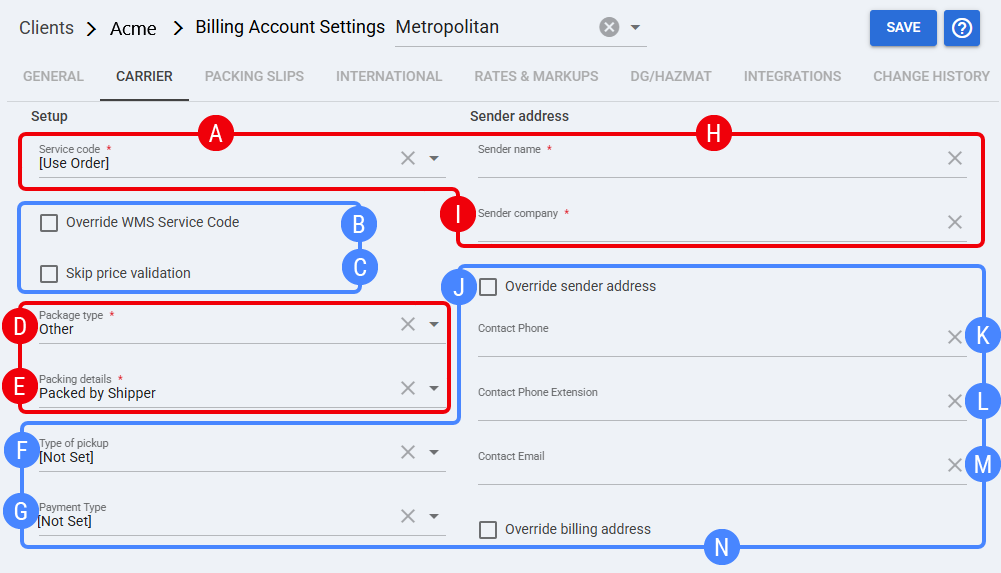
 | Service code: Default service selection for this billing account. If set to [Use Order], the order’s service selection is used. Service code can auto-populate depending on order context. |
 | Override WMS Service Code: When enabled, forces techSHIP to override the inbound/WMS service mapping and use the billing account/service selection rules. |
 | Skip price validation: Optional validation bypass. Use only if your workflow requires ignoring price validation checks for this client. |
 | Package type: Mandatory package classification used for operational handling and carrier request formatting. |
 | Packing details: Mandatory packing method/descriptor used by the carrier integration (client-level behavior). |
 | Type of pickup: Optional field to specify pickup building type for this client account (use when your operation needs it). |
 | Payment Type: Optional. Defines client-level billing/payment behavior for shipments when applicable. |
 | Sender name: Mandatory shipper contact/name used on documents. Configure as a single field in techSHIP unless your internal standard requires splitting. |
 | Sender company: Mandatory company/legal name used as shipper for this client account. |
 | Override sender address: Overrides shipper address details with the values configured in this billing account, replacing inbound/external values with the inputs from fields that display only when this option is checked:
|
 | Contact Phone: Optional. Phone number used for carrier contact/dispatch if required. |
 | Contact Phone Extension: Optional extension associated with Contact Phone. |
 | Contact Email: Optional email address used for notifications/dispatch contact. |
 | Override billing address: When enabled, overrides billing address details for this client account, replacing inbound/external values. |
 | To enable carrier-specific settings —and before continuing—, press Save. |
Next Steps
You can now use this account to ship through Metropolitan Warehouse & Delivery.
Was this article helpful?
That’s Great!
Thank you for your feedback
Sorry! We couldn't be helpful
Thank you for your feedback
Feedback sent
We appreciate your effort and will try to fix the article