![Article 1: ShipSavvy Onboarding Requirements and Configuration Guides [Information]](https://s3.amazonaws.com/cdn.freshdesk.com/data/helpdesk/attachments/production/96804813/original/7GJKyJXA3AM8E5itsPpDRjtqBPX6owOtKQ.png?1779474489) | ![Article 2: Reference Data: ShipSavvy Baseline Account Fields [Guide]](https://s3.amazonaws.com/cdn.freshdesk.com/data/helpdesk/attachments/production/96805389/original/PESWYE3uLdtYfrTR6D8pmzemRjxuhc873g.png?1779476661) | ![Article 3: Reference Data: ShipSavvy Client (Billing) Account Fields [Guide]](https://s3.amazonaws.com/cdn.freshdesk.com/data/helpdesk/attachments/production/96804742/original/bHFYZzIg1p3n6eidaRLAM0zP1uVKzHY4sw.png?1779473999) | ![Article 4: Reference Data: Order-Level ShipSavvy Fields [Guide]](https://s3.amazonaws.com/cdn.freshdesk.com/data/helpdesk/attachments/production/96804746/original/nvzXhnphxceM2NVyNNdVUi_M73glJphvXw.png?1779474008) |
| Onboarding and Configuration | Baseline Account | (Billing) Account | Order-Level Fields |
 You are here You are here |
This reference lists the carrier-specific ShipSavvy Baseline Account fields used in techSHIP configuration.
Use it together with the linked Baseline Account setup steps: the setup guide covers the shared configuration flow, while this article defines the confirmed field values, field behavior, and carrier-specific configuration details.
 |
For a complete overview of supported carriers and related setup guides, refer to techSHIP supported Carriers - Master List [Guides List].
|
 | Review ShipSavvy Onboarding Requirements and Configuration Guides [Information] before configuring the Baseline Account so required credentials and account settings are confirmed. |
TABLE OF CONTENTS
Adding a Baseline Account
Follow the UI Navigation steps in How to Add a Carrier Baseline Account [Step-by-Step guide], using the carrier-specific values provided in this guide.
Go to  | |
 |  |
| Essential Configuration | Carrier-Specific This article |
Carrier-Specific Instructions
| Return to | |
 |  |
| Essential Configuration | Carrier-Specific |
Carrier Tab
The Carrier tab contains the Baseline Account fields used to identify the ShipSavvy carrier connection and define confirmed carrier-specific configuration details. Red icons identify required fields, and blue icons identify fields not marked as required.
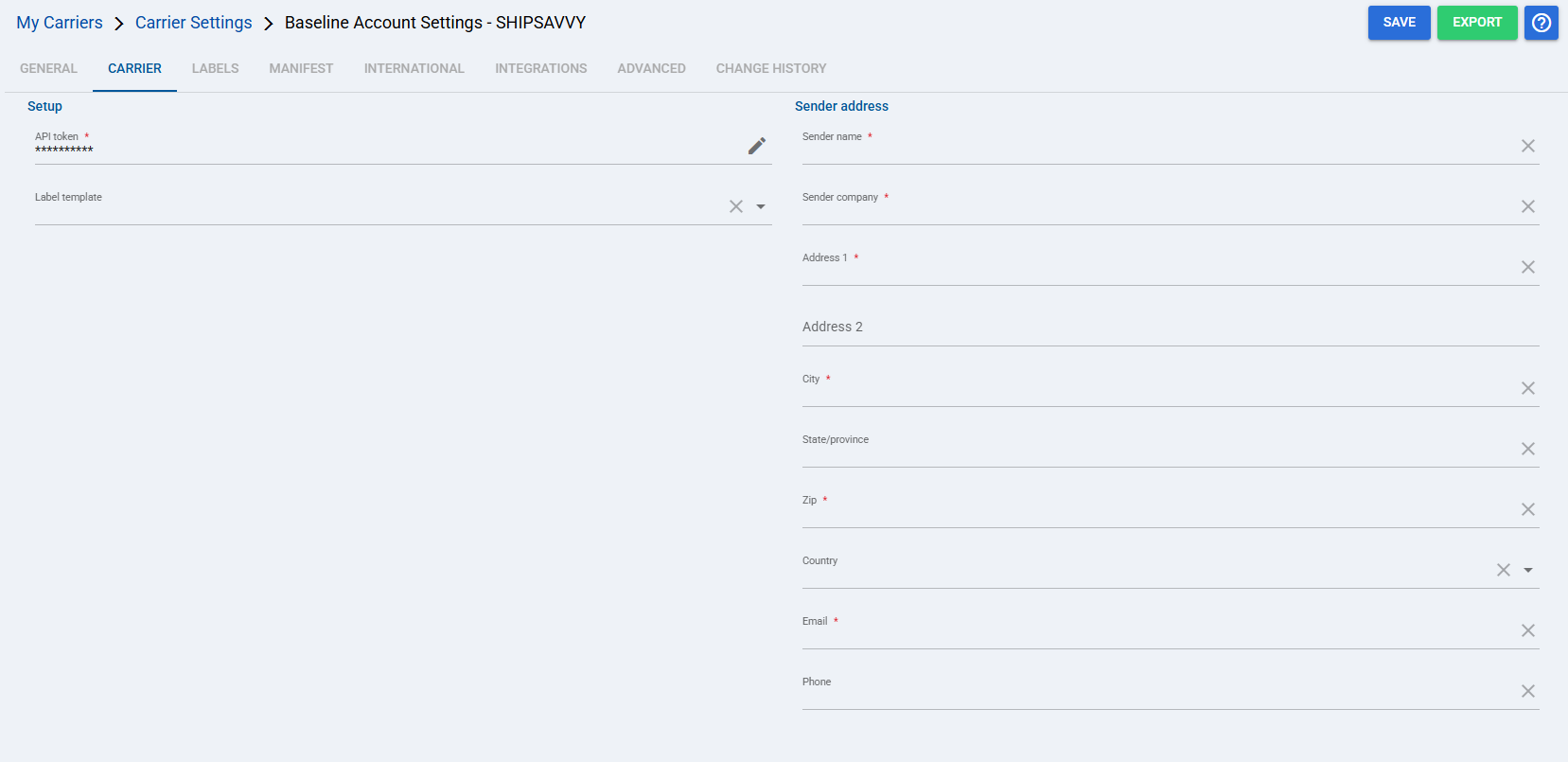
 | API token: Authenticates the ShipSavvy connection for this Baseline Account. The token allows techSHIP to connect with ShipSavvy for carrier transactions. |
 | Label template: Defines the label layout requested from ShipSavvy when labels are generated for shipments using this Baseline Account. |
 | Sender name: Identifies the sender contact name sent with shipments that use this Baseline Account. |
 | Sender company: Identifies the sender company or organization sent with shipments that use this Baseline Account. |
 | Address 1: Defines the primary sender street address used as part of the shipment origin details. |
 | Address 2: Provides secondary sender address details, such as suite, unit, floor, or other address qualifiers when applicable. |
 | City: Defines the sender city used to complete the shipment origin address. |
 | State/province: Defines the sender state or province used to complete the shipment origin address when the country or lane requires it. |
 | Zip: Defines the sender postal code used for address validation, rating, and shipment origin details. |
 | Country: Defines the sender country used to determine the shipment origin and cross-border lane context. |
 | Email: Provides the sender email address included with the sender contact details for shipments using this Baseline Account. |
 | Phone: Provides the sender phone number included with the sender contact details for shipments using this Baseline Account. |
Labels Tab
Set Mode to PDF, the confirmed label format supported for ShipSavvy.
| Select Save before continuing so the configured settings are applied. |
Finalizing the Setup
Once the Baseline Account has been created, validated, and saved, continue with Reference Data: ShipSavvy Client (Billing) Account Fields [Guide].
| Go to | |||
![Article 1: ShipSavvy Onboarding Requirements and Configuration Guides [Information]](https://s3.amazonaws.com/cdn.freshdesk.com/data/helpdesk/attachments/production/96804995/original/8TBA5Gx5zMbNVuxpBfz-CdrCvI4APxv9oQ.png?1779475304) | ![Article 2: Reference Data: ShipSavvy Baseline Account Fields [Guide]](https://s3.amazonaws.com/cdn.freshdesk.com/data/helpdesk/attachments/production/96805142/original/-hCPa73Oa_qPHu9q9vIfK7GGTavTCHKWGA.png?1779475839) | ![Article 3: Reference Data: ShipSavvy Client (Billing) Account Fields [Guide]](https://s3.amazonaws.com/cdn.freshdesk.com/data/helpdesk/attachments/production/96805392/original/fyeDiUtUuUfVRqUZR2oaGfPZOvJQgQ0sOg.png?1779476668) | |
| Onboarding and Configuration | Baseline Account | (Billing) Account | Order-Level Fields |
Was this article helpful?
That’s Great!
Thank you for your feedback
Sorry! We couldn't be helpful
Thank you for your feedback
Feedback sent
We appreciate your effort and will try to fix the article