This guide explains how to migrate an existing FedEx REST Baseline Account from customer-owned API credentials to credentials provided through the Techdinamics FedEx Integrator Program.
 |
The migration updates only the account authentication credentials. Existing Orders, shipping workflows, labels, and carrier functionality remain unchanged.
|
TABLE OF CONTENTS
Prerequisites
Before starting the migration, ensure that:
- The existing FedEx REST Baseline Account uses customer-owned API credentials.
- You have the account information required to complete FedEx registration, address validation, and authentication. See FedEx REST Onboarding Requirements and Configuration Guides [Information].
Migration Instructions
To migrate the account:
 | From the main navigation menu, go to Carriers → My Carriers. |
 | Locate the FedEx REST Baseline Account and click Edit. |
 | Select the Carrier tab. |
 | Optionally, export the Baseline Account to keep a backup of its current configuration. |
 | Clear the Own API key checkbox, then clear the values from User key and User password. |
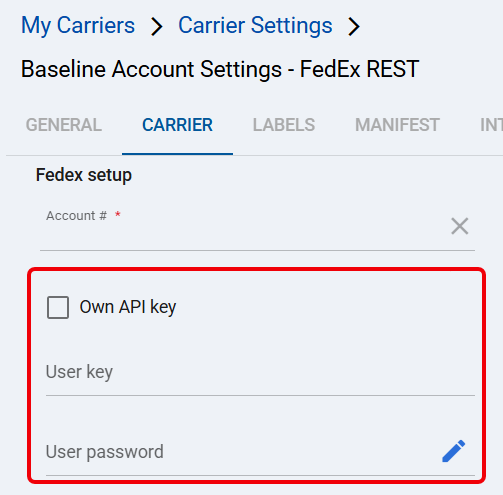
 | Click Save. |
 | Complete the FedEx registration and authentication workflow in How to Add a FedEx REST Baseline Account [Guide] → FedEx Registration and Authentication. After validation, confirm that techSHIP populated User key and User password, then click Save. |
The FedEx REST Baseline Account now uses the Techdinamics FedEx Integrator Program credentials.
Was this article helpful?
That’s Great!
Thank you for your feedback
Sorry! We couldn't be helpful
Thank you for your feedback
Feedback sent
We appreciate your effort and will try to fix the article