![Article 1: ShipSavvy Onboarding Requirements and Configuration Guides [Information]](https://s3.amazonaws.com/cdn.freshdesk.com/data/helpdesk/attachments/production/96804820/original/pQ_PTMs9GFD5Wpgr5rkepgZm7weklFsmZA.png?1779474515) | ![Article 2: Reference Data: ShipSavvy Baseline Account Fields [Guide]](https://s3.amazonaws.com/cdn.freshdesk.com/data/helpdesk/attachments/production/96804740/original/A-sKSzmZ_Vj4x4q6VoUBEk-gtdTDnv2kuQ.png?1779473989) | ![Article 3: Reference Data: ShipSavvy Client (Billing) Account Fields [Guide]](https://s3.amazonaws.com/cdn.freshdesk.com/data/helpdesk/attachments/production/96804742/original/bHFYZzIg1p3n6eidaRLAM0zP1uVKzHY4sw.png?1779473999) | ![Article 4: Reference Data: Order-Level ShipSavvy Fields [Guide]](https://s3.amazonaws.com/cdn.freshdesk.com/data/helpdesk/attachments/production/96804821/original/Jl5CA0KZwUmUI12R4nAd9jR2_RRmxSNI0A.png?1779474519) |
| Onboarding and Configuration | Baseline Account | (Billing) Account | Order-Level Fields |
 You are here You are here |
This reference lists the carrier-specific Order-Level ShipSavvy fields.
Use it together with the linked How to Edit an Order's Information article: the setup guide covers the shared order-editing flow, while this article defines the confirmed field values, field behavior, and carrier-specific configuration details available at the order level.
They apply only to the selected Order and may affect how that specific shipment is processed.
 |
This step is not required for carrier setup. For a complete overview of supported carriers and related setup guides, refer to techSHIP supported Carriers - Master List [Guides List].
|
 | Review and complete Reference Data: ShipSavvy Client (Billing) Account Fields [Guide] before processing orders with ShipSavvy so shipments use the required client billing configuration. |
TABLE OF CONTENTS
Editing an Order
Follow the UI Navigation steps in How to Edit an Order [Step-by-Step guide], using the carrier-specific values provided in this guide.
Go to  | |
 |  |
| Essential Configuration | Carrier-Specific This article |
Carrier-Specific Options
| Return to | |
 |  |
| Essential Configuration | Carrier-Specific |
The Carrier tab contains the carrier-specific fields available when editing an Order. These fields define confirmed order-level shipment behavior for the selected shipment. Red icons identify required fields, and blue icons identify fields not marked as required.
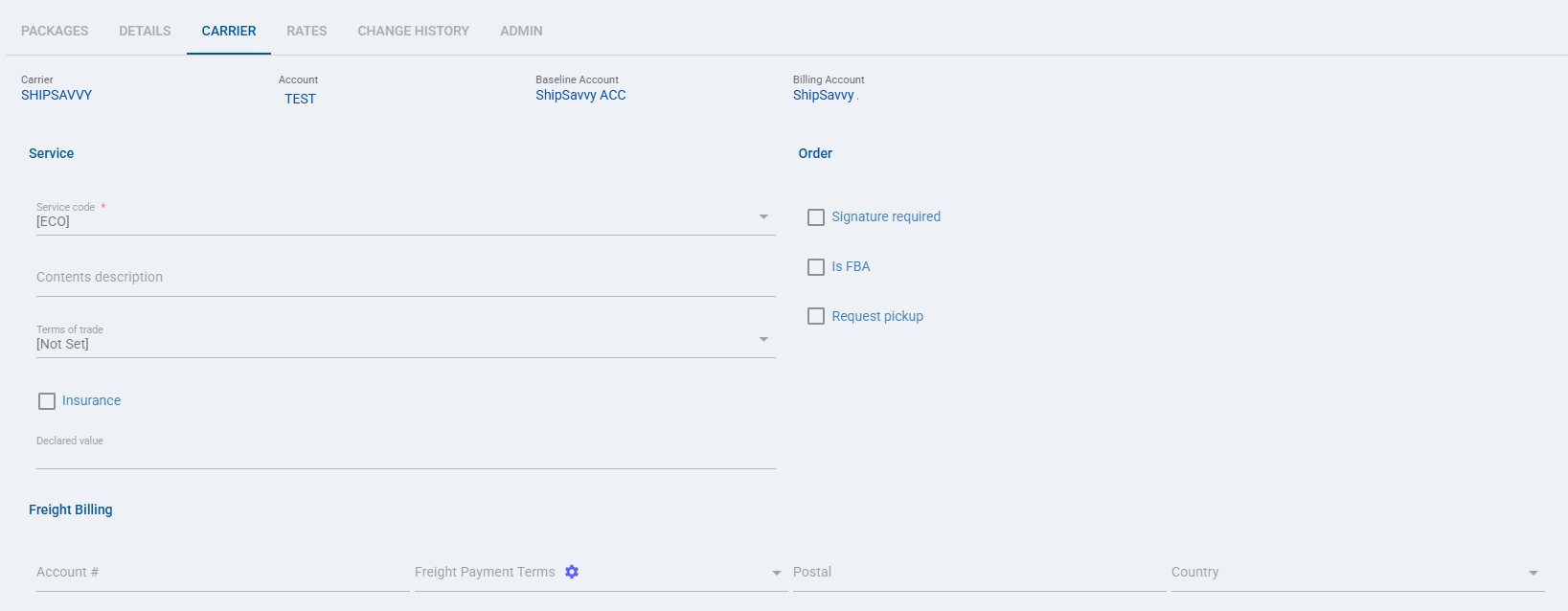
 | Service code: Defines the ShipSavvy service code used for the selected Order. |
 | Contents description: Defines the shipment contents description used for the selected Order. |
 | Terms of trade: Defines the terms of trade used for the selected Order. |
 | Insurance: Enables insurance for the selected Order. When selected, the Declared value field provides the shipment value used for insurance. |
 | Declared value: Defines the declared shipment value for the selected Order. |
 | Signature required: Requests signature service for the selected Order. This order-level value can override the client-level signature configuration. |
 | Is FBA: Identifies the selected Order as an FBA shipment when enabled. |
 | Request pickup: Requests the ShipSavvy pickup workflow for the selected Order. This setting affects whether the shipment uses the pickup/drop-off workflow for that order. |
| Select Save before continuing so the configured order-level settings are applied. |
Next Steps
After the Order is updated and saved, continue with the standard shipping workflow.
Was this article helpful?
That’s Great!
Thank you for your feedback
Sorry! We couldn't be helpful
Thank you for your feedback
Feedback sent
We appreciate your effort and will try to fix the article