Accounts are essential business sub-entities required to operate within techOMS organizations. Creating these accounts allows you to tailor workflows, order rules, and fulfillment channels for specific brands or clients.
This article explains how to create a new account associated with a specific organization.
 | Ensure no specific account is selected in the top header switcher. | |
| | ||
| If you need to create multiple accounts with similar configurations, consider cloning an existing one to use it as a template. For more information, refer to How to Clone Accounts within an Organization [Step-by-step guide]. | |
| | ||
To add an account to your organization, follow these steps:
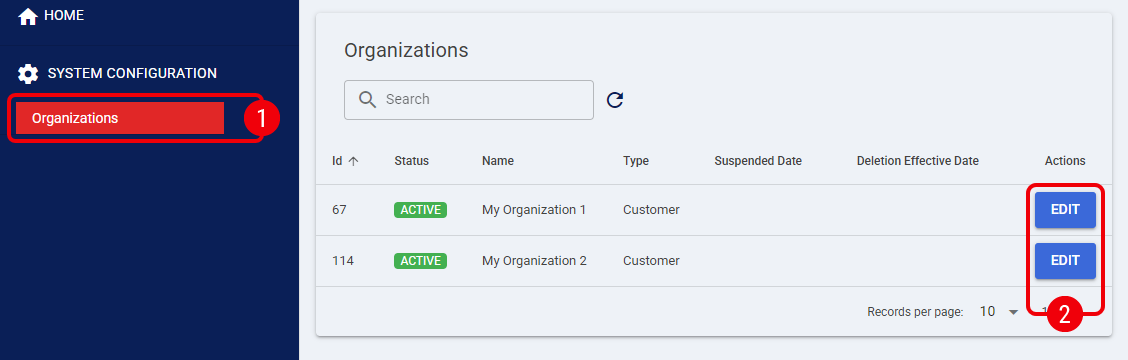
 | Click Organizations from the left menu under the System Configuration section. |
 | Press Edit for the desired organization. |
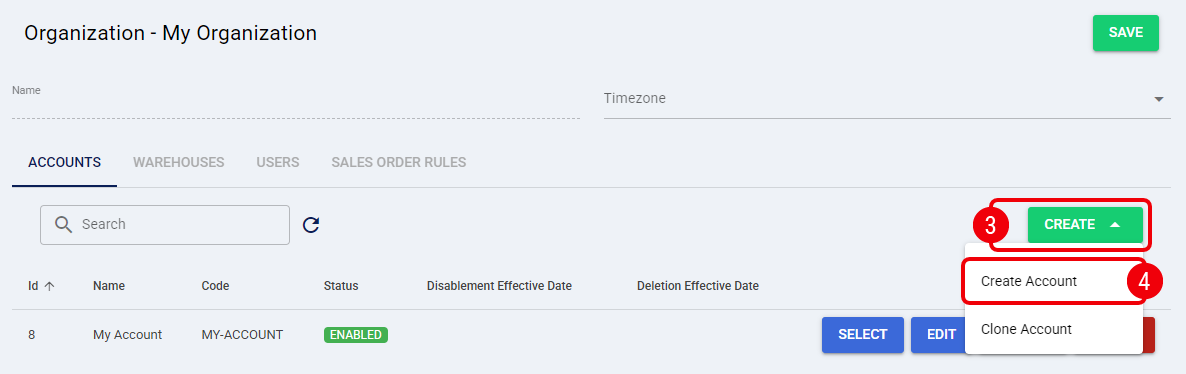
 | Press Create. |
 | Select Create Account from the options. |
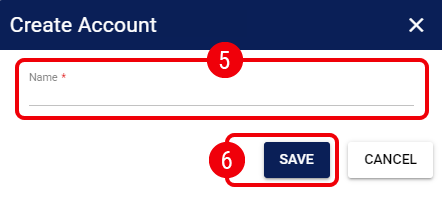
 | Enter the Name of the account. This will be used to identify it in lists and dropdowns throughout the system. |
| techOMS automatically generates the account Code in the background based on the Name provided (e.g., converting "My Account" to "MY-ACCOUNT"). If this generated code collides with an existing one (e.g., if you already have a "My-Account" in the system), a duplication error will appear, and you will need to adjust the Name to ensure a unique code is generated. Once the account is created successfully, the Code becomes permanent and will not change, even if you edit the Name later. | |
| | ||
 | Press Save to confirm the creation. |
The initial creation of the account is now complete. To finish its setup, you must configure its operational settings as detailed in How to Edit an Account [Step-by-step guide].
 | When you create a new account, its license type is set to Standard by default, which includes all features. If you need to modify the subscription tier, follow How to Update the License Type (Subscription) [Step-by-step guide]. To compare the features included in each tier, refer to the techOMS Specifications Sheet [Information]. | |
| | ||
Was this article helpful?
That’s Great!
Thank you for your feedback
Sorry! We couldn't be helpful
Thank you for your feedback
Feedback sent
We appreciate your effort and will try to fix the article