The Insights section in techOMS provides powerful, interactive dashboards to monitor key sales metrics, analyze your fulfillment performance, and get a clear overview of your operational health. This article shows you how to access them.
 NOTE: This feature requires special user permissions. To verify your permissions, see: techOMS User permissions structure [Information].
 NOTE: The dashboards available in your menu depend on your current subscription plan and configuration. Additionally, new dashboards may be released periodically. For a complete catalog of all available dashboards and their definitions, see: Insights Dashboards Master List [Guides List].
NOTE: Ensure that no account is selected in the header dropdown menu.
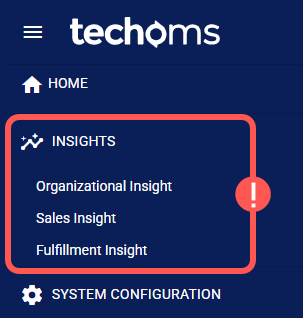
To access a dashboard, click the desired dashboard name under the Insights section in the left menu.
Once you access a dashboard, you can start analyzing your data. For guidance, see:
- Insights Dashboards Master List [Guides List], which provides an overview of all available dashboards and their main purpose.
- How to Use the Insights Dashboards [Guide], which explains how to filter, view details, and export data.
Was this article helpful?
That’s Great!
Thank you for your feedback
Sorry! We couldn't be helpful
Thank you for your feedback
Feedback sent
We appreciate your effort and will try to fix the article