When adding or updating MH10 labels in your environment, you will resort to import Baseline Accounts using an encrypted file.
 | The file you will import will be generated and provided by Techdinamics. |
 | Access to this functionality is restricted based on user roles:
|
To perform the deployment:
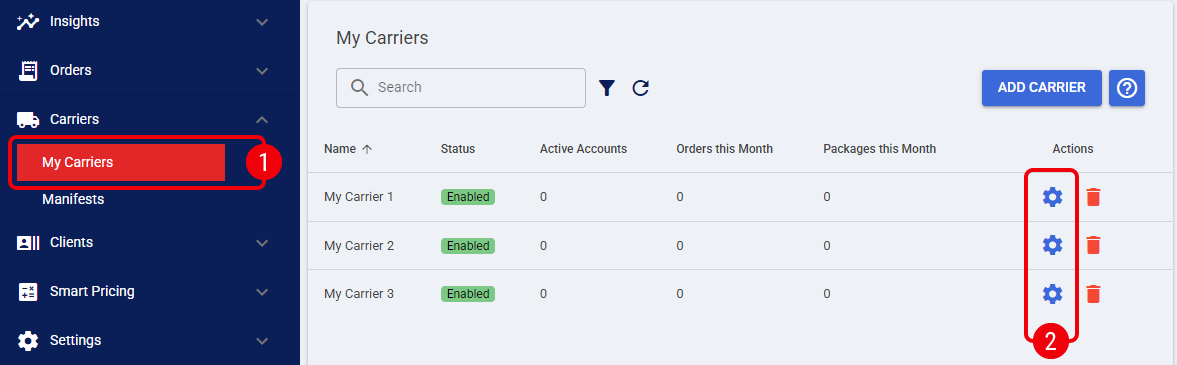
 | Click My Carriers from the left menu under the Carriers section. |
 | Click the Settings icon to edit the desired MH10 Label carrier profile. |
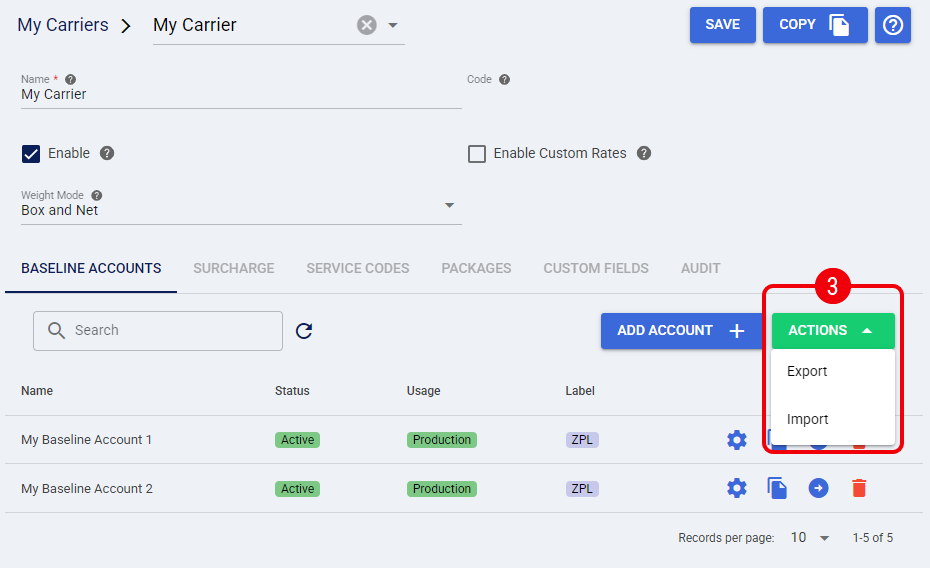
 | Press Actions and select Import, techSHIP will display a pop-up |
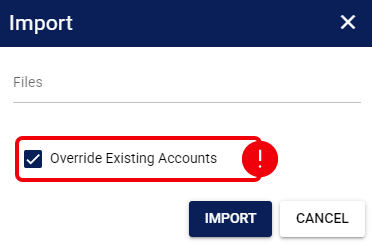
- Click Files and select the file provided by Techdinamics from your local drive
- Enable the Override Existing Accounts checkbox if you are updating a previous version of the MH10 label, if it's new, it's not necessary
- Press Import to complete the process
If the import is correct, techSHIP will display a confirmation message.
Was this article helpful?
That’s Great!
Thank you for your feedback
Sorry! We couldn't be helpful
Thank you for your feedback
Feedback sent
We appreciate your effort and will try to fix the article