To connect Leanafy, first create the Fulfillment Channel connection, and then set up its parameters.
Once the connection is established between the channel and techOMS, you can use its supported features as listed in: techOMS Fulfillment Channels - Master List [Guides List].
This article is divided into the following sections:
- Onboarding Requirements
- Create the Fulfillment Channel
- Configure Additional Parameters
- Specific Behaviors
 NOTE: Make sure that you are operating at the correct Account beforehand.
I. ONBOARDING REQUIREMENTS
- Leanafy API URL
- Leanafy API Key
- Leanafy API Secret
- Valid Leanafy credentials for the target warehouse/location.
- Confirmation of the product synchronization direction required for the account: Import Products, Export Products, or both.
- Warehouse/location configuration required for shipment, receipt, and inventory synchronization.
 WARNING: For product export from techOMS to Leanafy, the product must contain valid values for Name, SKU, Description, and UOM.
II. CREATE THE FULFILLMENT CHANNEL
To create a Leanafy Fulfillment Channel, follow: How to Create a Fulfillment Channel [Step-by-step guide].
III. CONFIGURE ADDITIONAL PARAMETERS
To configure additional parameters:
- Click Channels from the left menu under the Fulfillment Channels section.
- Click on the created channel's name.
- Use the highlighted areas in the screenshot below and configure the required settings.
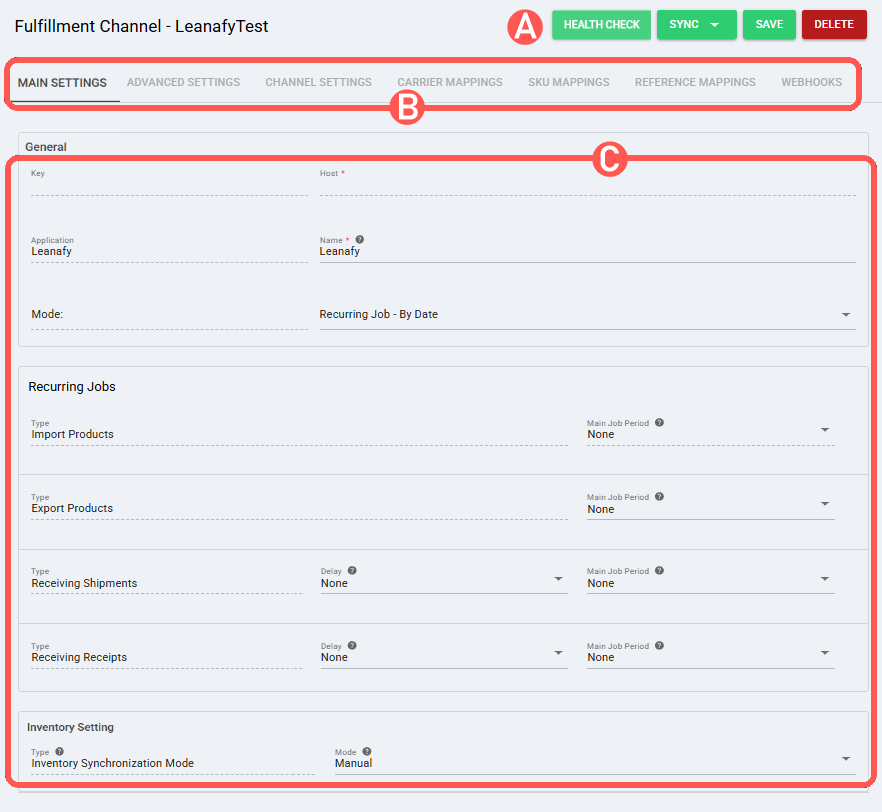
SECTIONS
A) QUICK ACTIONS lets you perform additional actions:
- Health Check: Verifies if the connection is active or not.
- Sync: Enables manual synchronization as detailed in How to Synchronize data through a Fulfillment Channel [Step-by-step guide].
Supported sync options:- Import Products from Channel: Imports products from Leanafy into techOMS.
- Export Products to Channel: Exports products from techOMS to Leanafy.
NOTE: Leanafy supports product import and product export operations. Product updates are not supported. Product existence validation is performed using the SKU field. WARNING: Product export can fail when required Leanafy product fields are missing. For example, Leanafy requires Description, even though Description is not mandatory in techOMS.- Receive Inventory Levels from Channel: Receives inventory levels from Leanafy.
- Send Shipments to Channel: Sends shipment data from techOMS to Leanafy.
- Receive Shipments from Channel: Receives shipment updates from Leanafy into techOMS.
NOTE: Receive Shipments from Channel receives shipped and cancelled shipment updates from Leanafy. Short-shipped updates are not pulled into techOMS automatically, and over-shipping is not supported by Leanafy for this flow.- Send Receipts to Channel: Sends receipt data from techOMS to Leanafy.
- Receive Receipts from Channel: Receives receipt updates from Leanafy into techOMS.
NOTE: Completed receipts are received in techOMS when the ARN is closed in Leanafy. Partial receiving is not pulled into techOMS automatically, and item unit values follow Leanafy as the source of truth. NOTE: The options displayed in the Sync dropdown are managed by techOMS based on the Master Product Source and the features supported by the specific Fulfillment Channel.- Save: Saves and commits changes.
- Delete: Deletes the channel connection.
B) VIEW SELECTION allows you to navigate the different tabs:
- Main settings (default): Configures general and automation behavior using: How to configure Automations for Sales/Fulfillment channels [Step-by-step guide].
The Recurring Jobs section can be used to configure the available recurring jobs for this channel, including product import/export and receiving shipment or receipt updates. - Advanced settings: Configures additional system/privacy settings using: How to manage Fulfillment Channels Advanced settings [Step-by-Step guide].
- Channel settings: Sets the channel integration parameters listed below.
 NOTE: The fields displayed in this section are dynamic. Based on your previous selections and the inherent capabilities of the channel, certain fields may be hidden, disabled, or cascaded.
Channel Settings (Fields)- Api Url: https://{your-leanafy-instance}
Leanafy API base URL used by techOMS to connect to the Leanafy environment. - Api Key: API key value provided by Leanafy
Credential used for Leanafy authentication. - Api Secret: API secret value provided by Leanafy
Credential used for Leanafy authentication. - Throughput: Default
Controls the throughput profile used by the channel.
- Api Url: https://{your-leanafy-instance}
- Carrier Mappings: Sets carrier/service name mappings as detailed in How to map Carriers and Services in a Fulfillment Channel [Step-by-step guide].
- SKU Mappings: Reviews and sets SKU mappings as detailed in How to map SKUs in a Fulfillment Channel [Step-by-step guide].
- Reference Mappings: Sets reference mappings for the channel.
C) CONTENT VIEW displays and/or allows editing of the settings in the "View Selection" section.
WARNING: Remember to press Save to commit the changes made in this section.IV. SPECIFIC BEHAVIORS
- Shipments: Shipments sent from techOMS to Leanafy are created as Orders in Leanafy.
- Shipment cancellation: Cancelling shipments from techOMS to Leanafy is not supported. Shipments cancelled in Leanafy can be received back into techOMS through the shipment receiving flow.
- Package handling: Leanafy associates one shipment with one package. Shipment updates are received at shipment level based on the information returned by Leanafy.
- Receipts: Purchase order receipts sent from techOMS to Leanafy are represented as ARNs in Leanafy.
Was this article helpful?
That’s Great!
Thank you for your feedback
Sorry! We couldn't be helpful
Thank you for your feedback
Feedback sent
We appreciate your effort and will try to fix the article