You can Draft previously created or approved Sales Orders.
This article describes the steps and fields involved in the process.
 NOTE: Make sure that you are operating at the right Vendor/Warehouse beforehand.
 NOTE: If you intend Draft a Sales Order as you create it, review the workflow in How to Create a Sales Order [Step-by-step guide].
To Draft a Sales Order you will have to:
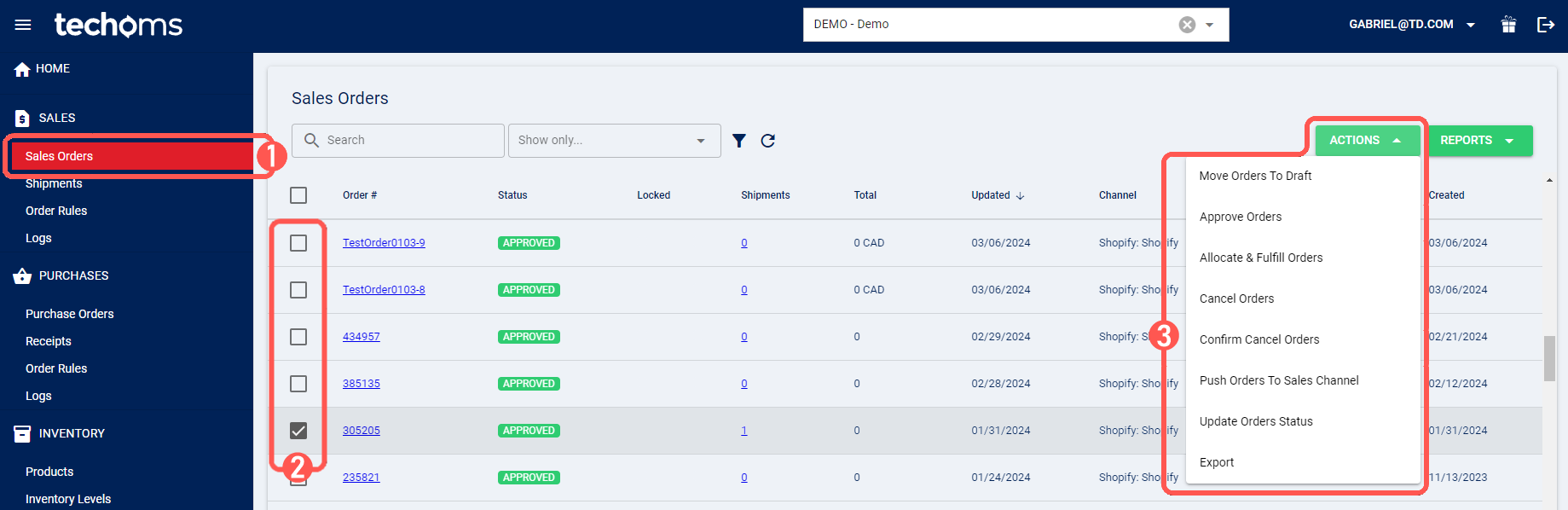
1. Click Sales Orders under Sales
2. Select all the orders you wish to Draft
3. Click Actions and select Move Orders to Draft
 NOTE: If the order was previously Approved, this action will impact your inventory levels. For more details on status implications, refer to Understanding Inventory Levels and Order Status Impact [Information] and Sales and Purchase Order Statuses Definitions [Information].
4. Click OK to confirm the action

The system will confirm the result of the action for either positive or negative result through a pop-up message.
Was this article helpful?
That’s Great!
Thank you for your feedback
Sorry! We couldn't be helpful
Thank you for your feedback
Feedback sent
We appreciate your effort and will try to fix the article