When setting up a beta sales channel, you will need to configure its Main Settings—a set of core options that define the channel's general behavior and automation.
This article explains the core configuration sections common to all beta sales channels in techOMS.
 | Any setting not listed in this article is considered channel-specific. Please review your channel's corresponding article in techOMS Sales Channels - Master List [Guides List] before proceeding. | |
| | ||
 | To check whether your sales channel is beta or stable, refer to techOMS Sales Channels - Master List [Guides List]. For stable channels, open the corresponding article to find their Main Settings instructions. | |
| | ||
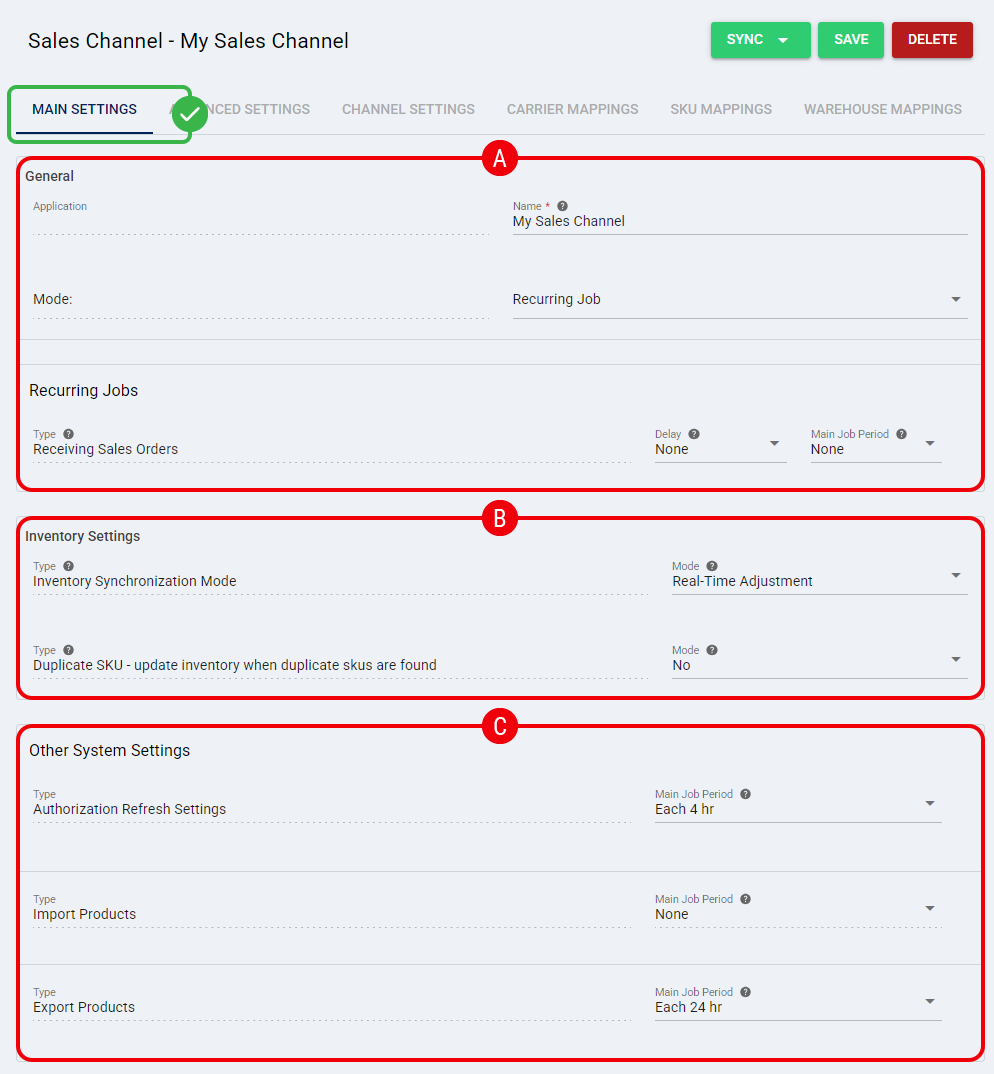
 | General: |
- Name: Sales channel name.
- Mode: Automation mode and settings. To learn more about automations, refer to How to configure Automations Jobs for Sales/Fulfillment channels [Step-by-step_guide].
 | Inventory Settings: |
This section covers how inventory is synchronized between techOMS and the sales channel, as detailed in How to Configure Inventory Synchronization for a Beta Sales Channel [Step-by-Step Guide].
 | Other System Settings: |
Use this section to configure additional operations, such as product synchronization and authorization token refreshes between techOMS and the sales channel. To configure these settings, see How to Configure Other System Settings for Beta Sales Channels [Step-by-Step Guide].
Was this article helpful?
That’s Great!
Thank you for your feedback
Sorry! We couldn't be helpful
Thank you for your feedback
Feedback sent
We appreciate your effort and will try to fix the article