To connect Logiwa, first create the Fulfillment Channel connection, and then set up its parameters. This Fulfillment Channel connects techOMS with the Logiwa IO Fulfillment Platform.
Once the connection is established between the channel and techOMS, you can use its supported features as listed in: techOMS Fulfillment Channels - Master List [Guides List].
This article is divided into the following sections:
- Onboarding Requirements
- Create the Fulfillment Channel
- Configure Additional Parameters
 NOTE: Make sure that you are operating at the correct Vendor/Warehouse beforehand.
I. ONBOARDING REQUIREMENTS
- Logiwa API access and connection details (API URL).
- Logiwa credentials: Email and Password.
- Logiwa account identifiers required by the integration: Client ID and Default Vendor (for PO's only).
II. CREATE THE FULFILLMENT CHANNEL
To create a Logiwa Fulfillment Channel, follow: How to Create a Fulfillment Channel [Step-by-step guide].
III. CONFIGURE ADDITIONAL PARAMETERS
To configure additional parameters:
- Click Channels from the left menu under the Fulfillment Channels section.
- Click on the created channel's name.
- Use the highlighted areas in the screenshot below and configure the required settings.
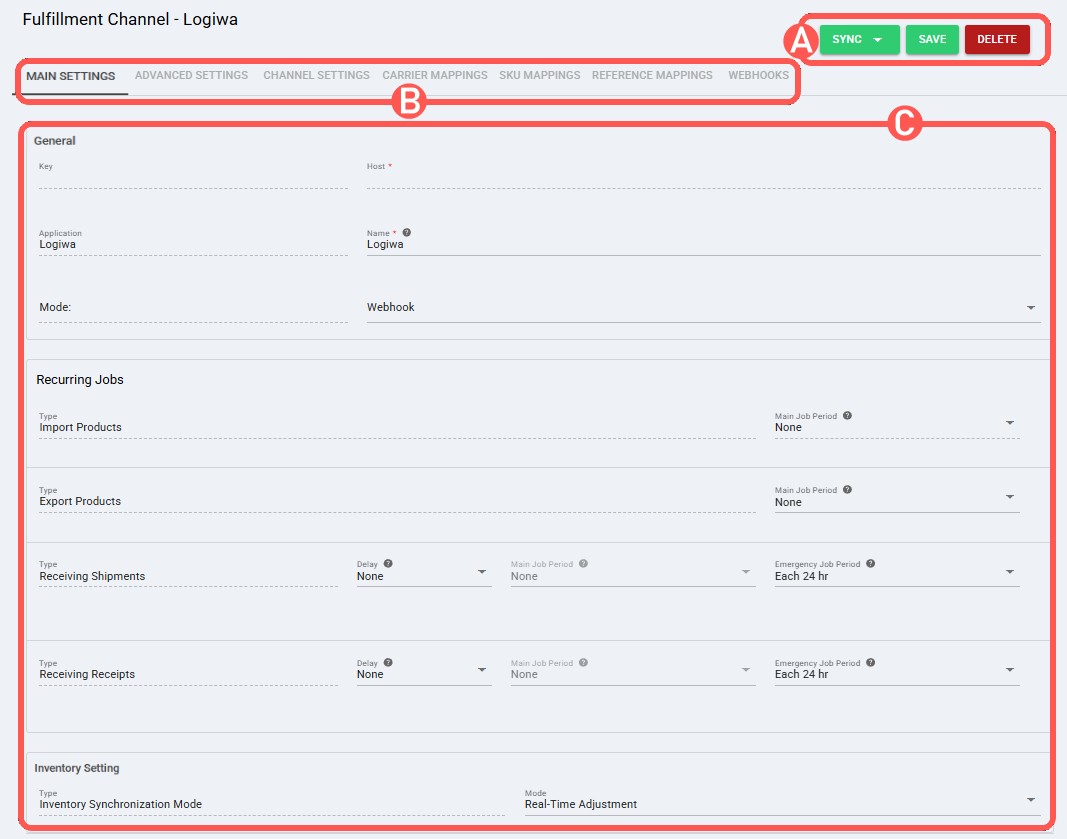
SECTIONS
A) QUICK ACTIONS lets you perform additional actions:
- Sync: Enables manual synchronization as detailed in How to Synchronize data through a Fulfillment Channel [Step-by-step guide].
Sync options(availability varies by channel, user permissions, and channel configuration):- Export Products To Channel
- Receive Inventory Levels From Channel
- Receive Shipments From Channel
- Receive Receipts From Channel
 WARNING: Cancel Receipt is not supported for this channel. NOTE: Only Tags that already exist in Logiwa are mapped when orders are exported from techOMS. Tags are mapped by ID, so tags that do not exist in Logiwa are ignored and will not be visible on the Logiwa side.
- Save: Saves and commits changes.
- Delete: Deletes the channel connection.
B) VIEW SELECTION allows you to navigate the different tabs:
- Main settings (default): Configures general and automation behavior using: Main Settings of a Beta Fulfillment Channel [Information].
- Advanced settings: Configures additional system/privacy settings using: How to manage Fulfillment Channels Advanced settings [Step-by-Step guide].
- Channel settings:
- Api Url: Logiwa API endpoint (base URL) used by the connector.
- Email: Email (username) used to authenticate with Logiwa.
- Password: Password used to authenticate with Logiwa.
- ClientId: Logiwa client identifier required for the API connection.
- Default Vendor (for PO's only): Default vendor name used by Logiwa when creating purchase orders through this channel. NOTE: This setting only works when creating purchase orders. If you need a different vendor per purchase order, you can override the vendor using Reference Mappings.
- Inventory Status: Inventory status used during inventory synchronization.
- Shipment Order Type: Shipment type name used for shipment processing/sync.
- Purchase Order Type: Receipt type name used for receipt processing/sync.
- Inventory Product Filter: Selects which Logiwa products are considered when receiving inventory updates based on product status. Available options are
Active Products,Inactive Products, andAll Products. NOTE: This setting applies when receiving inventory updates from Logiwa through recurring jobs or webhooks. All Productsdoes not filter inventory by product status. - Throughput: Default throughput configuration for the channel.
- Carrier Mappings: If available for this channel, sets carrier/service name mappings as detailed in How to map Carriers and Services in a Fulfillment Channel [Step-by-step guide].
- SKU Mappings: If available for this channel, reviews and sets SKU mappings as detailed in How to map SKUs in a Fulfillment Channel [Step-by-step guide].
- Reference Mappings: Reviews and sets reference mappings as detailed in How to map References in a Fulfillment Channel [Step-by-step guide]. NOTE: When fulfilling orders, Logiwa custom text field values can be copied to techOMS references for shipments and receipts. Empty values are not saved. Receipt reference values may be created by the integration, but receipt reference visibility depends on the techOMS Receipt UI.
- Webhooks: If this channel supports webhooks and exposes the Webhooks tab, follow: How to configure Automations for Sales/Fulfillment channels [Step-by-step guide]. NOTE: Follow How to configure Automations for Sales/Fulfillment channels [Step-by-step guide] to configure automations, such as Recurring Jobs or Webhooks.
WARNING : To receive updates through Logiwa webhooks, make sure the channel Mode is set to Webhook in Main Settings. For inventory updates, set Inventory Synchronization Mode to Real-Time Adjustment and confirm the warehouse is mapped correctly. NOTE: For Logiwa, webhooks can automatically update shipment status changes, receipt completion, and inventory adjustments in techOMS. WARNING: Remember to press Save to commit the changes made in this section.Was this article helpful?
That’s Great!
Thank you for your feedback
Sorry! We couldn't be helpful
Thank you for your feedback
Feedback sent
We appreciate your effort and will try to fix the article