![Article 1: UPS (REST) Onboarding Requirements and Configuration Guides [Information]](https://s3.amazonaws.com/cdn.freshdesk.com/data/helpdesk/attachments/production/96804815/original/09VBUo14zVrZ7P3XOYSoWXIqqrVjGFCUUQ.png?1779474501) | ![Article 2: Reference Data: UPS (REST) Baseline Account Fields [Guide]](https://s3.amazonaws.com/cdn.freshdesk.com/data/helpdesk/attachments/production/96804740/original/A-sKSzmZ_Vj4x4q6VoUBEk-gtdTDnv2kuQ.png?1779473989) | ![Article 3: Reference Data: UPS (REST) Client (Billing) Account Fields [Guide]](https://s3.amazonaws.com/cdn.freshdesk.com/data/helpdesk/attachments/production/96805395/original/_J10u70kSFBTHPSpib4jtXfeu4C3mm54wg.png?1779476680) |
| Onboarding and Configuration | Baseline Account | (Billing) Account |
 You are here You are here |
This reference lists the carrier-specific UPS (REST) Client (Billing) Account fields used in techSHIP.
Use it together with the linked Client (Billing) Account setup steps: the setup guide covers the shared configuration flow, while this article defines the confirmed field values, field behavior, and client-specific carrier configuration details.
 |
For a complete overview of supported carriers and related setup guides, refer to techSHIP supported Carriers - Master List [Guides List].
|
 | Review and complete Reference Data: UPS (REST) Baseline Account Fields [Guide] before configuring the Client (Billing) Account so the carrier connection is available. |
TABLE OF CONTENTS
Adding a Client (Billing) Account
Follow the UI Navigation steps in How to Add a Carrier Billing Account [Step-by-Step guide], using the carrier-specific values provided in this guide.
Go to  | |
 |  |
| Essential Configuration | Carrier-Specific This article |
Carrier-Specific Instructions
| Return to | |
 |  |
| Essential Configuration | Carrier-Specific |
The Carrier tab contains the Client (Billing) Account fields used to define confirmed carrier-specific behavior for this client. Field names and order follow the current UPS (REST) UI.
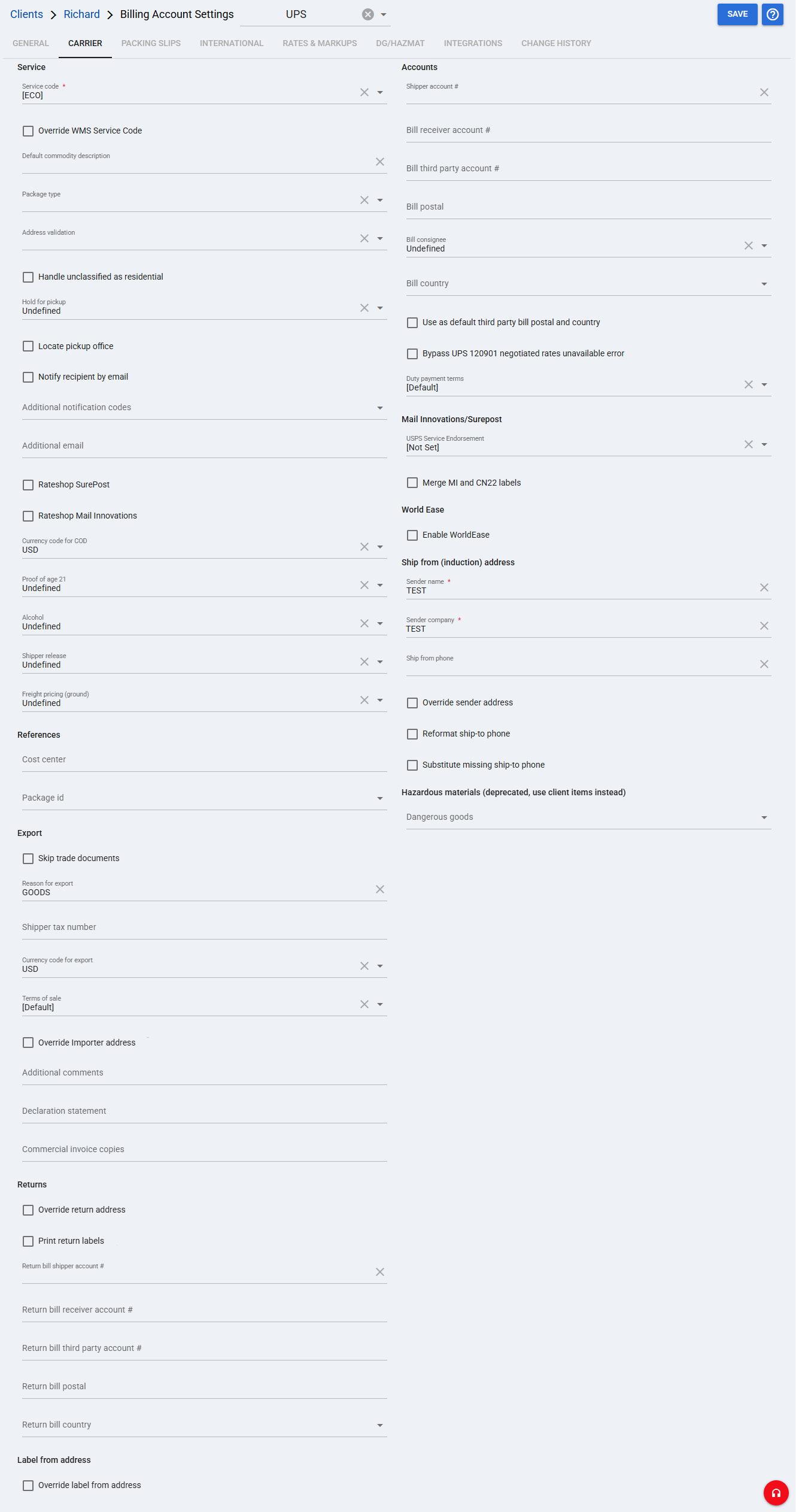
 | Service code: Choose a service code to assign to imported orders that do not have a service code, or keep the service code received with the order. The configuration can use the service level received with the order, ECO mode to obtain the cheapest applicable service, or a selected service level. For consolidator setups, use the applicable service subcode when shipping must be narrowed to a specific provider or service. Override WMS Service Code: When enabled, overwrites a service code received from the WMS with the selected Service code. Default commodity description: Specifies the Client (Billing) Account default commodity description sent to the UPS shipment description when a higher-precedence value is not provided. The existing precedence is order → batch → Client (Billing) Account default. |
 | Package type: Specifies the package type used by the account. It can be a specific or variable package type depending on the configuration. Address validation: Selects the address validation level. UPS also detects residential destinations, which can affect applicable charges and services. Handle unclassified as residential: Controls the current UPS setting for handling an unclassified address as residential. Hold for pickup: Configures the current UPS hold-for-pickup selection. Locate pickup office: Enables the current UPS pickup-office option. Notify recipient by email: Enables recipient email notification. Additional notification codes: Specifies additional notification codes. Additional email: Specifies an additional email used with the notification configuration. Rateshop SurePost: Includes SurePost results in Rate Shopping. Rateshop Mail Innovations: Includes Mail Innovations results in Rate Shopping. Additional Mail Innovations rating configuration is required. Currency code for COD: Specifies the currency code used for COD. Proof of age 21: Configures the current UPS proof-of-age option. Alcohol: Configures the current UPS Alcohol option. Shipper release: Configures the current UPS Shipper release option. Freight pricing (ground): Configures the current UPS Freight pricing (ground) option. |
 | Shipper account #: Specifies the UPS shipper account number. Bill receiver account #: Specifies the UPS receiver account number when applicable. Bill third party account #: Specifies the third-party UPS account number when applicable. Bill postal: Specifies the postal code associated with the applicable billing account. Bill consignee: Specifies the current UPS consignee billing selection. Bill country: Specifies the country associated with the applicable billing account. Use as default third party bill postal and country: Uses the configured postal code and country as the default third-party billing postal and country information. Bypass UPS 120901 negotiated rates unavailable error: Allows shipments to process when UPS returns tracking numbers, labels, and charges together with the 120901 Negotiated rates are unavailable at this time alert. When this option is disabled, the alert blocks processing. Duty payment terms: Specifies the applicable duty payment terms. |
 | Cost center: Specifies the current UPS Cost center value. Package id: Specifies the current UPS Package id selection. |
 | USPS Service Endorsement: Specifies the current USPS Service Endorsement selection used by the UPS configuration. Merge MI and CN22 labels: Controls the current option to merge Mail Innovations and CN22 labels. Enable WorldEase: Enables the current UPS WorldEase option. |
 | Skip trade documents: Controls the current UPS Skip trade documents option. Reason for export: Specifies the reason for export when applicable. Shipper tax number: Specifies the shipper tax number when applicable. Currency code for export: Specifies the currency code used for export information. Terms of sale: Specifies the applicable terms of sale. Override Importer address: Enables the current importer-address override option. Additional comments: Specifies additional export comments. Declaration statement: Specifies the declaration statement. Commercial invoice copies: Specifies the commercial invoice copy configuration. |
 | Override return address: Enables the return-address override. Print return labels: Enables return-label printing. Return bill shipper account #: Specifies the shipper account for return billing. Return bill receiver account #: Specifies the receiver account for return billing. Return bill third party account #: Specifies the third-party account for return billing. Return bill postal: Specifies the postal code for return billing. Return bill country: Specifies the country for return billing. Override label from address: Enables an override of the label-from address. |
 | Sender name: Specifies the sender name for this UPS Client (Billing) Account. Sender company: Specifies the sender company for this UPS Client (Billing) Account. Ship from phone: Specifies the phone number for the ship-from address. Override sender address: Overrides the sender address inherited from the source Baseline Account. Reformat ship-to phone: Controls the current UPS ship-to phone reformat option. Substitute missing ship-to phone: Controls the current UPS option to substitute a missing ship-to phone. |
| Complete the Ship from phone field in the Ship from (induction) address section. If this information is missing, the carrier may not process the order. |
 | Dangerous goods: This field remains visible under the deprecated Hazardous materials (deprecated, use client items instead) section. Use the client-item Dangerous Goods configuration described in How to specify Dangerous Goods shipping and Regulation type [Step-by-Step Guide] instead of the deprecated Client (Billing) Account section. |
| If UPS Mail Innovations requires a packaging option that is not compatible with the regular UPS service packaging option, configure a separate Client (Billing) Account profile with a package type valid for the service. |
| Click Save before continuing so the configured settings are applied. |
Next Steps (Optional)
If you are Rate Shopping with this account, you can specify which services should be taken into consideration or excluded using the applicable service inclusion/exclusion configuration.
When using UPS Mail Innovations, verify that the related Baseline Mail Innovations settings and Rateshop Mail Innovations option are configured as required for the account.
Was this article helpful?
That’s Great!
Thank you for your feedback
Sorry! We couldn't be helpful
Thank you for your feedback
Feedback sent
We appreciate your effort and will try to fix the article