This guide explains how to configure Saia REST-specific settings in the Carrier tab of an Order.
A Carrier Tab configuration defines transaction-level behavior that applies only to the selected Order. These settings are enforced by the carrier and may vary depending on the selected service, shipment type, and accessorial configuration.
 |
For a complete overview of supported carriers and related setup guides, refer to techSHIP supported Carriers - Master List [Guides List].
|
TABLE OF CONTENTS
Prerequisites
Before configuring the Order's Carrier tab, ensure that:
A Saia REST Client (Billing) Account has been created. See: How to Add a Saia REST Client (Billing) Account [Guide].
Follow the configuration steps as described in: 05 - How to edit an order’s information - [Step-by-Step guide] using the values provided below.
Carrier-Specific Options
The Carrier tab contains the Saia REST-specific configuration used to define operational behavior for this Order. Fields in this view are grouped visually to distinguish mandatory (red-highlighted items) and optional (blue-highlighted items) carrier-specific settings.
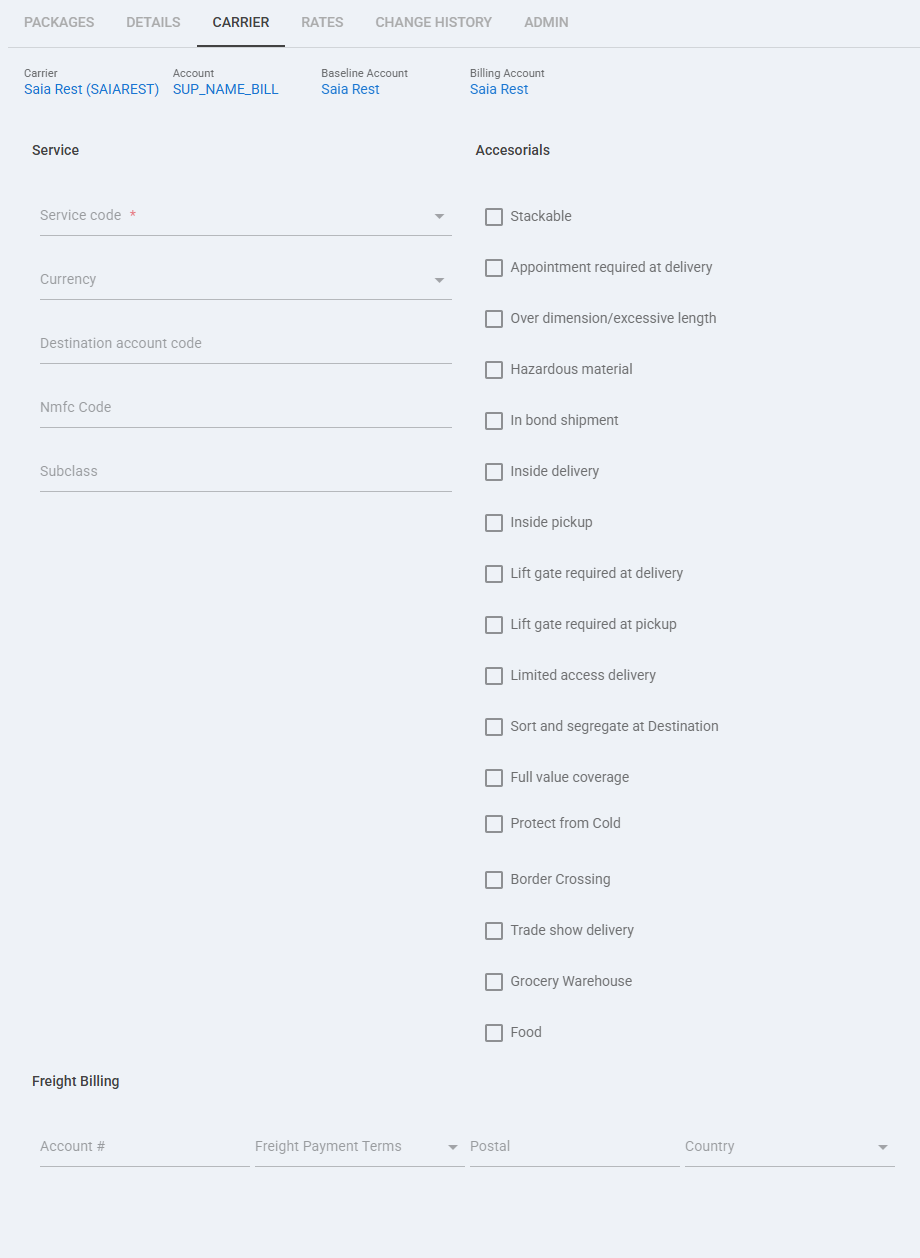
 | Service code: Select the service that should be applied to this order when a specific Saia REST service selection is required. |
 | Currency: Use this optional field only when the shipment requires a specific currency value. |
 | Destination account code: Use this field when the order must ship using a destination billing account, typically with Collect payment terms. |
 | Nmfc Code: Enter the NMFC code required for the freight commodity when it must be set at order level. |
 | Subclass: Use this field to provide the subclass value associated with the freight classification when required. |
 | Physical handling accessorials: Use these options to request shipment handling services such as Stackable, Over dimension / excessive length, Inside delivery, Inside pickup, Lift gate required at delivery, Lift gate required at pickup, and Limited access delivery. |
 | Special shipment accessorials: Use these options when the order requires special carrier handling, including Appointment required at delivery, Sort and segregate at Destination, Trade show delivery, and Grocery Warehouse. |
 | Regulatory and protected shipment options: Use these accessorials when required by the order, including Hazardous material, In bond shipment, Full value coverage, Protect from Cold, and Border Crossing. |
 | Food: Enable this option when the shipment must be processed as food. This option is used during shipment processing and is not included in rate requests. |
 | Freight Billing: Use the Account and Freight Payment Terms fields to define the billing method for this specific order. Order-level payment terms are used only when the Client (Billing) Account enables third-party billing order override; otherwise, the Billing Account payment settings apply. |
 | Postal / Country: Complete these Freight Billing fields when the payer address for the billing scenario requires postal and country values. |
 | To enable carrier-specific settings —and before continuing—, press Save. |
Next Steps
You can now ship this Order through Saia REST.
Was this article helpful?
That’s Great!
Thank you for your feedback
Sorry! We couldn't be helpful
Thank you for your feedback
Feedback sent
We appreciate your effort and will try to fix the article