Use this guide to create a Location User in techSHIP.
This procedure covers the common user information required to create the account and save it.
 | For detailed conceptual information, advanced configuration, and checking the required permissions to perform this procedure, refer to techSHIP User Permissions Structure [Information]. If you need to confirm which user-management capabilities are available for your subscription, refer to techSHIP Specifications Sheet [Information]. | |
| | ||
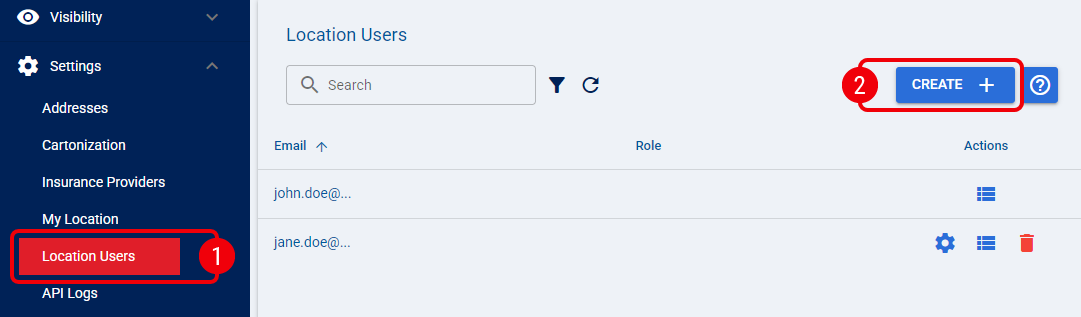
 | From Settings, select Location Users. |
 | Click Create to open the Create User dialog. |
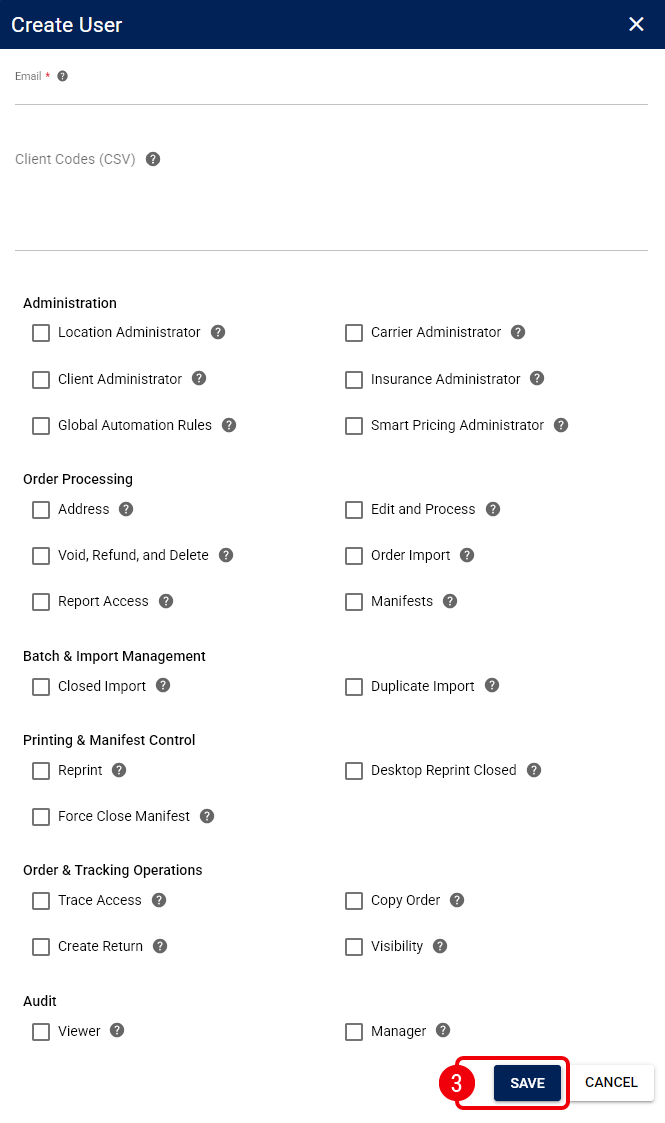
 | Enter the required information and select Save: |
- Email: Enter the email address the user uses to sign in to techSHIP.
- Client Codes (CSV): When your techSHIP subscription allows it, limit the user's client access. Refer to How to Configure Client Access for a Location User [Step-by-Step Guide] for more information.
- Permission controls: Assign the permissions the user needs. Refer to How to Assign Permissions to a Location User [Step-by-Step Guide] for more information.
The Location User is created in techSHIP.
Was this article helpful?
That’s Great!
Thank you for your feedback
Sorry! We couldn't be helpful
Thank you for your feedback
Feedback sent
We appreciate your effort and will try to fix the article