Finding tracking numbers allows you to view their details to learn more about the location of goods, enhance customer satisfaction, resolve shipment issues, and ensure regulatory compliance.
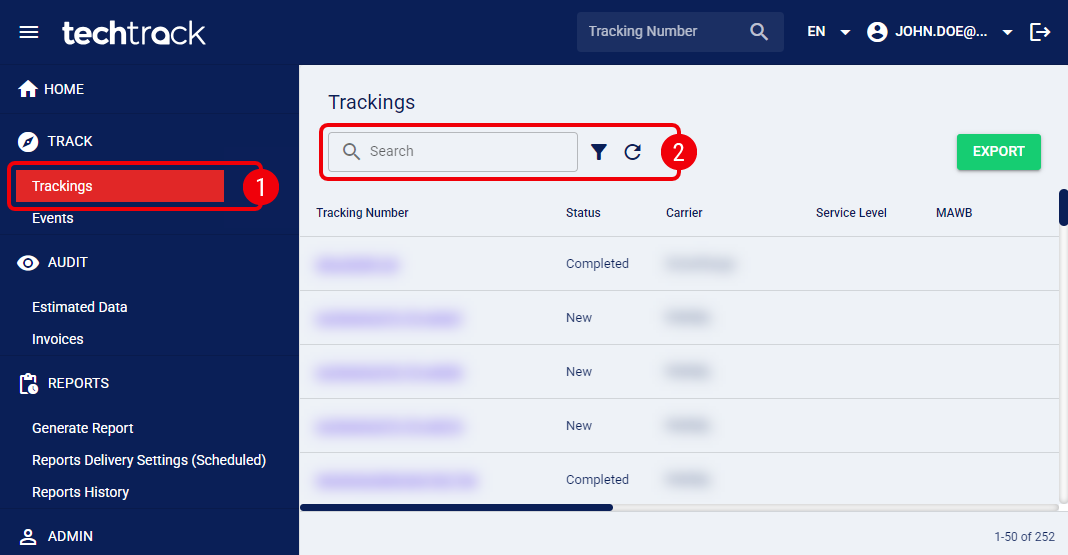
 | Click Trackings from the left menu under the Track section. |
 | Filter the tracking numbers using the Search bar (to quickly search by Tracking Number or Master Tracking Number) or click on the filter icon to apply an Advanced Filter. |
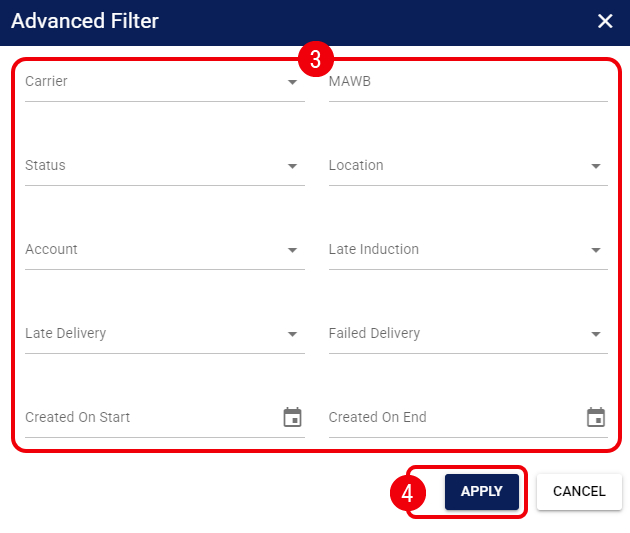
 | Modify any of the following fields as needed: |
Carrier: Select the carrier responsible for the shipping service.
MAWB: Enter the Master Air WayBill (MAWB) number for air freight shipments.
Status: Select the current status of the shipment.
Location: Filter by the specific location associated with the shipment.
Account: Select the specific Account associated with the shipments.
Late Induction: Select Yes to filter for shipments that were not inducted by the carrier within the expected timeframe.
Late Delivery: Select Yes to filter for shipments that have exceeded their Expected Delivery Date (EDD).
Failed Delivery: Select Yes to filter for shipments where a delivery attempt was unsuccessful.
Created On Start / Created On End: Select a date range to filter shipments based on when they were created in the system.
 |
For more information on these fields, see: Introducing Shipment Visibility and Tracking [Guide].
|
 | Press Apply to review the filtered tracking numbers. |
Once you identify the desired shipment, click the Tracking Number to open it.
Was this article helpful?
That’s Great!
Thank you for your feedback
Sorry! We couldn't be helpful
Thank you for your feedback
Feedback sent
We appreciate your effort and will try to fix the article