techOMS allows you to track and synchronize lot and serial numbers with your fulfillment and sales channels during order creation, receipts, and shipments. This feature enhances product traceability, improves order fulfillment accuracy, and provides granular inventory control across your operations.
This article explains how techOMS handles lot-based inventory, order allocation rules, and synchronization throughout the fulfillment lifecycle.
Prefer listening? This podcast-style audio walks you through the article's key points.
 | AI-Assisted & Human-Reviewed: For general information only. Please double-check important details. | |
 | Lot and serial number synchronization is available on supported fulfillment channels only. To use this feature, the Lot/Serial Number Pass-Through options must be enabled. Other channel-specific limitations may apply, so you should refer to your specific Fulfillment Channel setup guide article, as listed in techOMS Fulfillment Channels - Master List [Guides List]. | |
| | ||
TABLE OF CONTENTS
- Lot Tracking and Order Allocation
- Inventory Display Mechanics
- Lot and Serial Number Synchronization Lifecycle
Lot Tracking and Order Allocation
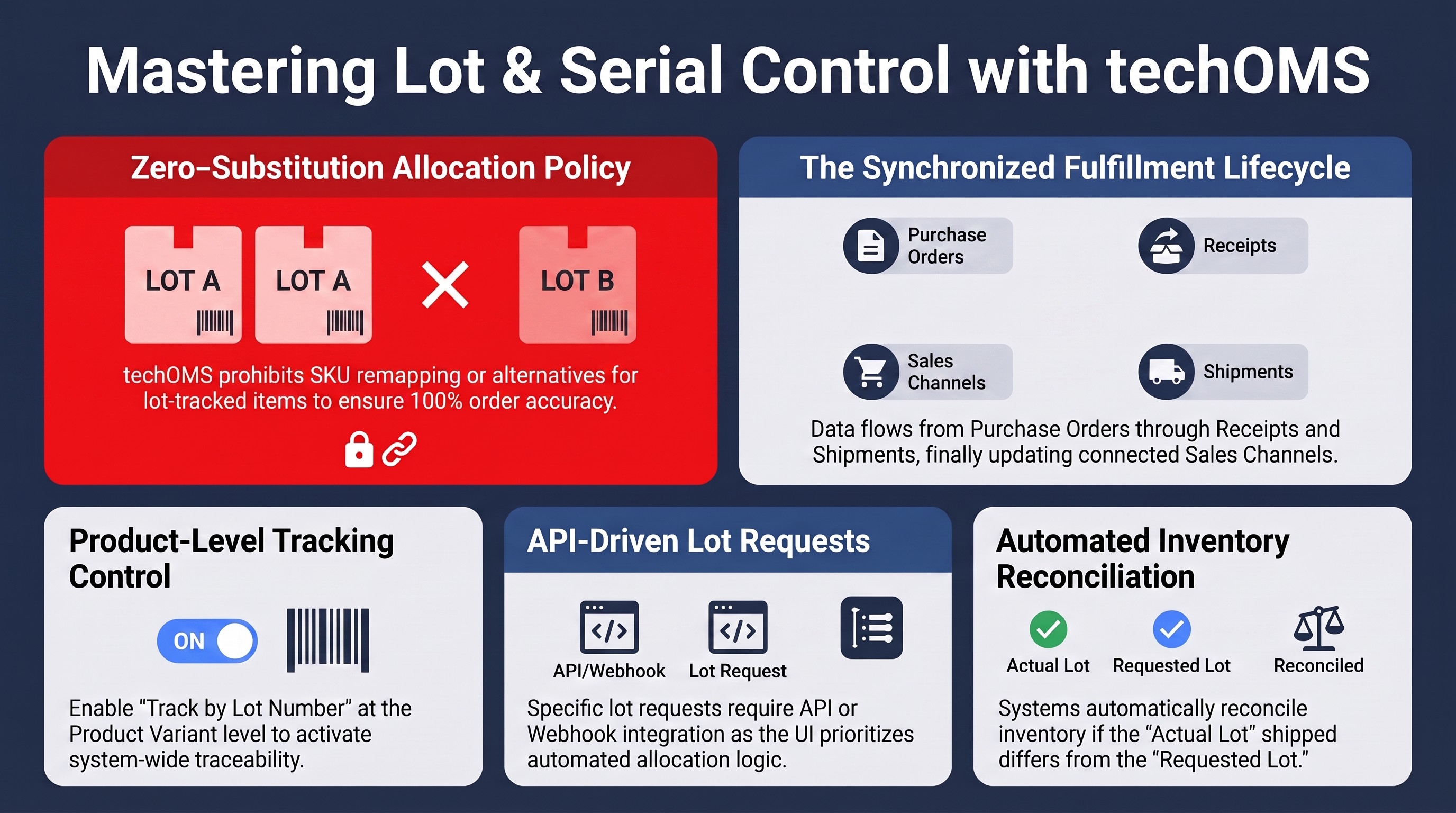
You can configure lot tracking at the Product Variant level by enabling Track by Lot Number. For instructions on configuring this option, refer to How to Edit a Product Variant or Details [Step-by-Step Guide].
For supported Sales Channels, techOMS can use a specific requested lot during Sales Order allocation. See techOMS Sales Channels - Master List [Guides List] to review supported integrations.
When the originally requested Product Variant has Track by Lot Number enabled, techOMS preserves the requested SKU during allocation. If the inbound order also specifies a Requested Lot, only inventory matching both the requested SKU and that lot is eligible for allocation.
| Requesting a specific lot number is designed for system integrations through APIs or Webhooks. You cannot request a specific lot when creating or editing a Sales Order manually through the techOMS user interface. For more information, see Getting started using techOMS API [Information] and How to Create and Set Up a Webhook [Step-by-step guide]. | |
| | ||
Replacement Behavior for Lot-Tracked Products
When the originally requested Product Variant is configured with Track by Lot Number, techOMS prevents allocation mechanisms that would replace or remap that requested product.
The following replacement mechanisms do not replace a lot-tracked source Product Variant:
- Product Alternatives are ignored during allocation.
- Product Variant Substitution does not replace the requested Product Variant.
- Product Variant Mapping does not replace the requested Product Variant.
- Fulfillment Channel SKU Mapping, when configured to act as an allocation alternative, does not replace the requested Product Variant.
These restrictions are determined by the originally requested or source Product Variant. The tracking configuration of the replacement or mapped destination Product Variant does not determine whether the restriction applies.
Sales Order Rules are not globally disabled for lot-tracked products. Only actions that would replace, substitute, or remap the requested Product Variant are suppressed; non-replacement actions continue to operate according to their normal configuration.
Insufficient Inventory
If there is insufficient inventory for the requested SKU and lot combination, techOMS does not use an alternate, substitute, or mapped Product Variant to fulfill the unavailable quantity.
When Split Shipment is not applied, the unavailable quantity remains unallocated rather than being fulfilled with a replacement product.
When Split Shipment is applied, techOMS can allocate the available quantity from the requested SKU and lot while leaving the remaining quantity pending. Replacement products are not used for the remaining quantity.
Inventory Display Mechanics
To help you manage lot-controlled products, the Inventory Levels view dynamically groups your inventory records. For instructions on navigating this view and using filters, refer to How to View a Lot and Serial Numbers [Step-by-Step Guide].
Lot and Serial Number Synchronization Lifecycle
During the order lifecycle, lot and serial numbers are synchronized and available across purchasing, receiving, fulfillment, and connected sales channels.
Purchase Orders
When a Purchase Order is created and remains in Draft status, you can manually add lot and serial numbers. These values are then transmitted directly to your connected Fulfillment Channel.
Receipts
techOMS receives lot and serial numbers from the Fulfillment Channel for confirmed receipts and saves them in the corresponding Receipt record.
Shipments
techOMS receives lot and serial numbers from external Fulfillment Channels for shipped and closed orders and saves them in the corresponding Shipment record. If you fulfill orders internally using the built-in techOMS Packing Module, you can manually register this tracking information during the fulfillment process.
| When you manually register tracking data, Serial Numbers and Lot Numbers are not strictly linked. For detailed validation rules and limitations, refer to Understanding the techOMS Packing Module [Information]. | |
| | ||
When a shipment is confirmed, techOMS compares the Actual Lot reported by the fulfillment facility with the Requested Lot associated with the shipment.
If the Actual Lot matches the Requested Lot, the shipment follows the normal inventory processing flow.
If the Actual Lot differs from the Requested Lot, techOMS reconciles the lot-level inventory by restoring or releasing the inventory associated with the Requested Lot and deducting the shipped quantity from the Actual Lot. The Shipment record reflects the Actual Lot used for fulfillment.
For different-lot reconciliation:
- The Actual Lot must be active, belong to the same SKU, and exist in the shipment's warehouse/location. If explicit lot tracking is used and the Actual Lot is missing or invalid, techOMS rejects the fulfillment without committing partial inventory changes.
- For a partial or short fulfillment, techOMS reconciles only the quantity actually fulfilled. If a valid Actual Lot has insufficient availability, the reconciliation still completes and its inventory can temporarily become negative until inventory synchronization corrects the balance. This differs from Insufficient Inventory, which applies during allocation of the Requested SKU and Requested Lot.
- Each shipment line can be reconciled against only one Actual Lot. If multiple lots are physically used, you must represent them as separate shipment lines.
This reconciliation keeps your Inventory Levels aligned with the lot that physically shipped while preserving traceability between the Requested Lot and Actual Lot through the available shipment, order, or reconciliation history.
Sales Channels
After fulfillment is complete, techOMS sends the shipped lot numbers back to your connected Sales Channels.
| Sending shipped lot numbers is available on supported sales channels only. See techOMS Sales Channels Master List [Guides List] for the complete list of supported integrations. | |
| | ||
Was this article helpful?
That’s Great!
Thank you for your feedback
Sorry! We couldn't be helpful
Thank you for your feedback
Feedback sent
We appreciate your effort and will try to fix the article