techOMS tracks inventory movements and availability to ensure accurate order fulfillment and stock management. Understanding how different order statuses and actions affect your inventory levels is crucial for maintaining accurate stock counts across your network.
This article explains the definitions of different inventory levels and how operational actions, such as shipments and receipts, impact those quantities.
Prefer listening? This podcast-style audio walks you through the article's key points.
 | AI-Assisted & Human-Reviewed: For general information only. Please double-check important details. | |
| | ||
TABLE OF CONTENTS
Inventory Level Definitions
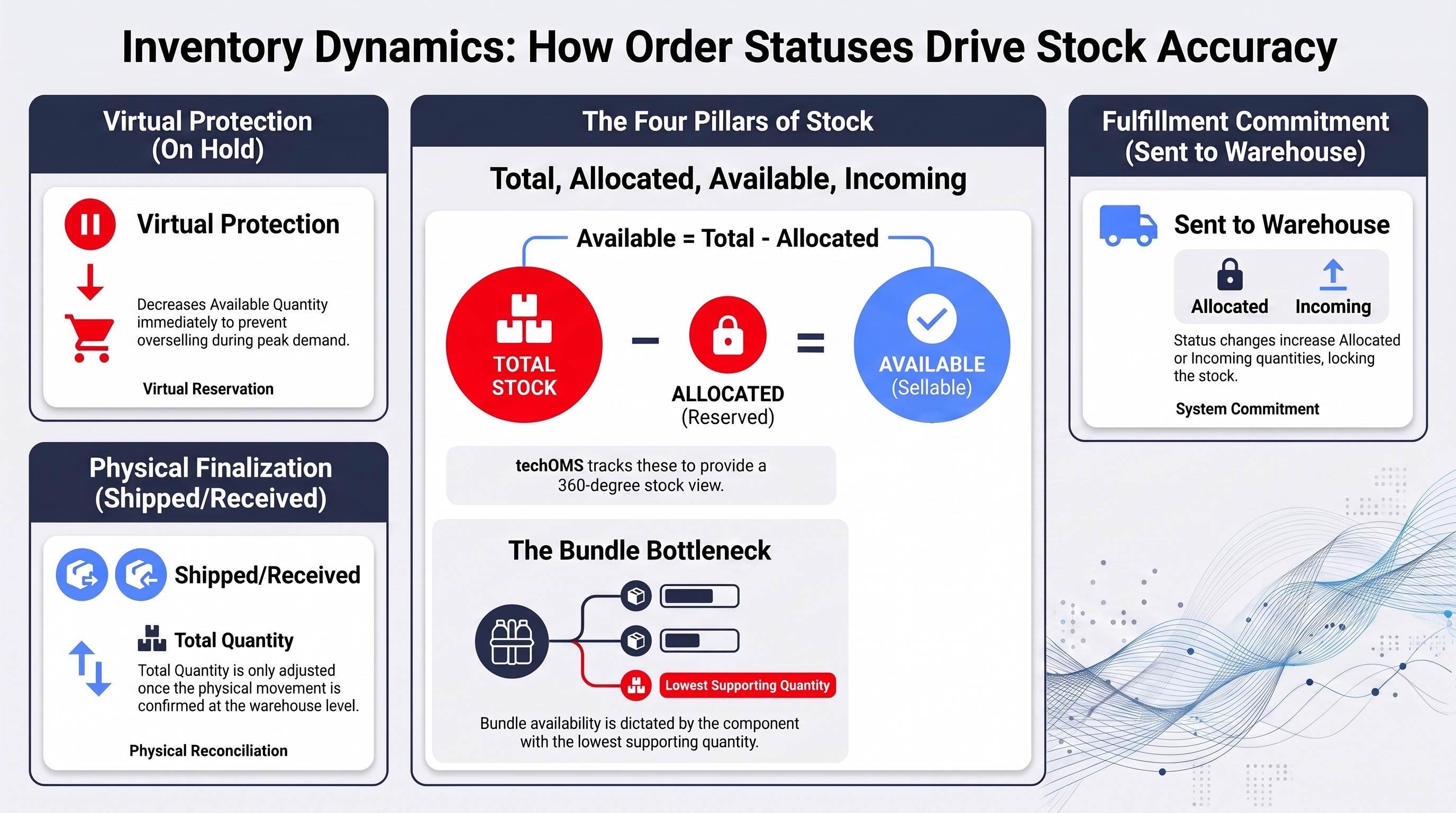
The inventory engine in techOMS relies on four core metrics to determine stock availability:
- Total Quantity: The absolute physical count of an item currently residing in a warehouse.
- Allocated Quantity: The amount of inventory reserved for open sales orders that have not yet been fulfilled.
When you review an Allocated Quantity in Inventory Levels, the Allocated Orders drill-down shows only the Sales Orders that currently contribute to the selected SKU/inventory allocation. You can view the applicable order details only when you have permission to access them. If you do not have the required permission, protected order-detail data is not exposed.
- Available Quantity: The sellable stock that is ready to be committed to new orders (calculated as Total Quantity minus Allocated Quantity and any protected stock).
- Incoming Quantity: The expected inventory from active purchase orders that are in transit but have not yet been received.
Bundle Inventory Availability
A Bundle SKU does not represent independently stocked inventory. Instead, techOMS derives its available bundle quantity from the current Available Quantity of the Product Variants configured as required Bundle Parts.
To determine the available bundle quantity, techOMS considers both the Available Quantity of each required component and the Quantity configured for that Bundle Part. The system calculates how many complete bundles each component can support, and the component that supports the fewest complete bundles determines the final Bundle SKU Available Quantity.
Only complete bundles count toward availability, so fractional bundle quantities are not possible. If any required component has no available inventory, including a zero or unavailable quantity, the resulting Bundle SKU Available Quantity is zero.
For example, if Component A has an Available Quantity of 10 and requires 1 unit per bundle, it supports 10 complete bundles. If Component B has an Available Quantity of 10 and requires 2 units per bundle, it supports 5 complete bundles. Therefore, the Bundle SKU Available Quantity is 5.
When an eligible Bundle SKU is included in a Full Inventory Synchronization to a Sales Channel, techOMS sends the currently calculated bundle quantity rather than treating the Bundle SKU as independently stocked inventory.
When a supported inventory event changes the calculated Bundle SKU Available Quantity, techOMS can propagate the updated quantity through the applicable Sales Channel real-time inventory flow. If recalculation produces the same quantity, no new bundle inventory adjustment is propagated. Real-time bundle recalculation is currently limited to specific inventory events and does not apply to every component inventory change.
| In techOMS, the definitions above primarily apply to physical warehouses. For virtual warehouses, these quantities represent the real-time aggregated sum of their physical members. For detailed calculation rules, please refer to Understanding Virtual Warehouses and Virtual Inventory [Information]. | |
| | ||
| Inventory allocation can now occur at a granular Lot Number dimension for lot-tracked products. For detailed information on how allocation impacts specific lot quantities, refer to Understanding Lot and Serial Numbers [Information]. | |
| | ||
For a visual overview of how stock management interacts with other subsystems, refer to techOMS Feature Operations Diagram [Information].
Shipments and Receipts Status Impact
As orders progress through their lifecycle, the inventory levels automatically adjust to reflect the physical and logical reality of your stock.
| Shipments and receipts are processed strictly against physical warehouses. Virtual warehouses are currently read-only and do not alter the operational workflow of an order. | |
| | ||
The following table details how specific order statuses impact your physical inventory metrics:
STATUS | BY SHIPMENT (SO) | BY RECEIPT (PO) |
New | No impact. | No impact. |
On Hold | Available Quantity decreases. (Allocated Quantity remains unchanged) | N/A |
Ready To Send | Allocated Quantity increases. Available Quantity decreases. (Shipments not yet sent to fulfillment channel due to error, or the Manual Packing module is in use). | Incoming Quantity increases. (Receipts not yet sent to fulfillment channel due to error). |
Packing (SO) / Packed (SO) / Processing (SO) | No impact. | N/A |
Sent To Warehouse | Allocated Quantity increases. Available Quantity decreases. | Incoming Quantity increases. |
Receiving | N/A | Total Quantity increases. Incoming Quantity decreases equal to the amount processed in the finalized receipts. |
Shipped (SO) / Received (PO) | Allocated and Total Quantities are reduced. | Total Quantity increases. Incoming Quantity decreases. |
Short Shipped (SO) / Short Received (PO) | Allocated Quantity decreases completely. Total Quantity decreases by the shipped amount. Available Quantity increases by the difference. | Incoming Quantity decreases completely. Total Quantity increases by the received amount. |
Cancelled | Allocated Quantity decreases. Available Quantity increases. | Incoming Quantity decreases. |
| For a detailed definition of what each status means within the order lifecycle, please refer to Sales and Purchase Order Statuses Definitions [Information]. For complete details on the internal fulfillment workflow and its inventory behavior, refer to Understanding the techOMS Packing Module [Information]. | |
| | ||
Was this article helpful?
That’s Great!
Thank you for your feedback
Sorry! We couldn't be helpful
Thank you for your feedback
Feedback sent
We appreciate your effort and will try to fix the article