Creating Support Tickets and Sharing Context [Guide]Location User permissions in techSHIP determine which pages and modules you can access and which actions you can perform within pages you can otherwise access.
This article explains which Location User permission is required for page and menu access, what each feature-level permission enables, and the main permission interactions and limitations you should consider when configuring access.
 | Available pages and permissions can depend on your subscription. For subscription-specific availability, refer to techSHIP Specifications Sheet [Information]. Additionally, some options (such as the Insurance Administrator, Global Automation Rules, and Smart Pricing Administrator permissions) are available only when their corresponding features are enabled for your location. | |
| | ||
| If a profile belongs to an Organization User, it appears as read-only in Settings > Location Users, and you cannot modify its permissions from this page. For information about global users and roles, refer to Understanding Organization Users [Guide].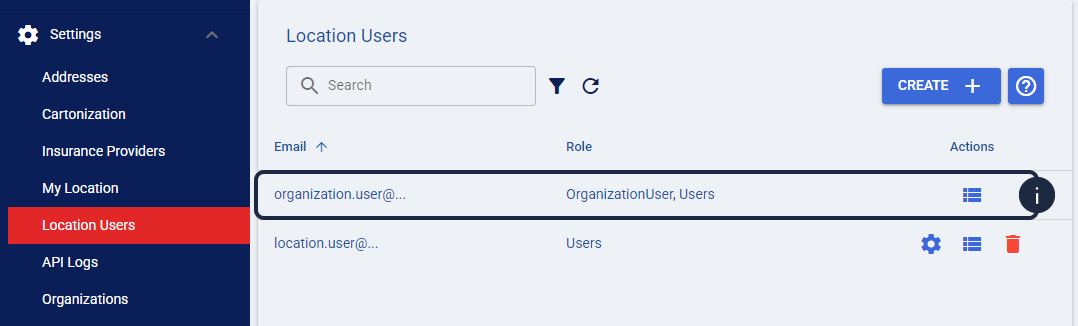 | |
| | ||
TABLE OF CONTENTS
- How Location User Permissions Work
- Page and Menu Access
- Location User Permissions
- Permission Behavior and Limitations
How Location User Permissions Work
Some Location User permissions grant access to a page or module, while others enable a specific action within functionality you can already access.
Administration permissions are configured independently. Changing the Address permission does not change administrative permissions such as Location Administrator, Carrier Administrator, or Client Administrator.
Before proceeding, make sure you read and understand the following articles:
- To configure permissions for an existing user, refer to How to Assign Permissions to a Location User [Step-by-Step Guide].
- To create a new user, refer to How to Create a Location User [Step-by-Step Guide].
- To understand the current navigation and where pages appear, refer to Understanding the New Menu Structure in techSHIP [Guide].
Page and Menu Access
The following table lists the Location User permissions required to access pages and menu items in techSHIP.
CATEGORY | PAGE / MENU ITEM | REQUIRED LOCATION USER PERMISSION | ADDITIONAL REQUIREMENT / ACCESS LEVEL |
Insights | Shipment Profile | Location Administrator Carrier Administrator | Availability depends on your subscription. |
Insights | Delivery Performance | Location Administrator Carrier Administrator | Availability depends on your subscription. |
Insights | Executive Summary (Beta) | Location Administrator Carrier Administrator | Availability depends on your subscription. |
Insights | Customer Insights (Beta) | Location Administrator Carrier Administrator | Availability depends on your subscription. |
Orders | My Orders | None | Read-only access is available to all users. Actions within orders depend on the corresponding feature permissions. |
Orders | Returns | None | Read-only access is available to all users. Creating a return requires the Create Return permission. |
Carriers | My Carriers | Carrier Administrator | — |
Carriers | Manifests | Manifests | — |
Carriers | Pickup Schedule | Location Administrator Carrier Administrator | — |
Clients | Clients | Client Administrator | — |
Clients | Templates | Client Administrator | The corresponding feature must be enabled. |
Clients | Products / Items | Client Administrator | — |
Clients | Rule Sets | Global Automation Rules | — |
Clients | Custom Lists | Global Automation Rules | — |
Smart Pricing | Custom Pricing Tables | Location Administrator Carrier Administrator Smart Pricing Administrator | Smart Pricing must be enabled. |
Smart Pricing | Markup Profiles (beta) | Location Administrator Carrier Administrator Smart Pricing Administrator | Smart Pricing must be enabled. |
Smart Pricing | Zones & Areas | Location Administrator Carrier Administrator Smart Pricing Administrator | Smart Pricing must be enabled. |
Smart Pricing | Pricing Dimensions | Location Administrator Carrier Administrator Smart Pricing Administrator | Smart Pricing must be enabled. |
Smart Pricing | Accessorial Collections | Location Administrator Carrier Administrator Smart Pricing Administrator | Smart Pricing must be enabled. |
Smart Pricing | Markup Profiles | Smart Pricing Administrator | Markup Profiles must be enabled. |
Visibility | Tracking | Visibility | — |
Audit | Invoices | Viewer Manager | Viewer provides read-only access. Manager provides management access. |
Settings | Addresses | Address | — |
Settings | Cartonization | Location Administrator | — |
Settings | Insurance Providers | Insurance Administrator | Custom Insurance must be enabled. |
Settings | My Location | Location Administrator | — |
Settings | Location Users | Location Administrator | — |
Settings | API Logs | Location Administrator | — |
Settings | Organizations | Organization Admin | Organization Admin is an Organization-level role. Refer to Understanding Organization Users [Guide]. |
Settings | Locations | Organization Admin | Organization Admin is an Organization-level role. Refer to Understanding Organization Users [Guide]. |
Reports | Generate | Report Access | — |
Reports | History | Report Access | — |
Reports | Schedule | Location Administrator | — |
| Location Administrator and Carrier Administrator also allow you to edit the WMS # on processed orders. | |
| | ||
Location User Permissions
The following table lists every permission available when configuring a Location User, including permissions whose page-access effects are already covered in Page and Menu Access above.
PERMISSION GROUP | PERMISSION | FEATURE / ACTION ENABLED | DEPENDENCY / IMPORTANT INTERACTION |
Administration | Location Administrator | Grants full administrative access to the location, including Insights, Smart Pricing, Settings, and Reports. You can also create support tickets from Support. | Grants page and menu access as described in Page and Menu Access above. For more information on the Support feature, see: Creating Support Tickets and Sharing Context [Guide]. |
Administration | Carrier Administrator | Grants administrative access to Carrier configurations, including Carriers, Smart Pricing, and Insights. You can also create support tickets from Support. | Grants page and menu access as described in Page and Menu Access above. For more information on the Support feature, see: Creating Support Tickets and Sharing Context [Guide].. |
Administration | Client Administrator | Grants administrative access to client configurations, including Clients, Templates, and Products / Items. | Grants page and menu access as described in Page and Menu Access above. |
Administration | Insurance Administrator | Grants administrative access to insurance configurations. | Grants page and menu access as described above. Custom Insurance must be enabled. |
Administration | Global Automation Rules | Allows you to manage global automation rules, including Rule Sets and Custom Lists. | Grants page and menu access as described in Page and Menu Access above. |
Administration | Smart Pricing Administrator | Allows you to manage Smart Pricing configurations, including Custom Pricing Tables, Accessorial Collections, and Markup Profiles. | Grants page and menu access as described above. Smart Pricing must be enabled. |
Order Processing | Address | Allows you to access and manage addresses in Settings. | Grants page and menu access as described in Page and Menu Access above. |
Order Processing | Edit and Process | Allows you to manage and process orders, including editing orders and changing the Carrier. | This permission enables actions within order workflows rather than unlocking the Orders page. |
Order Processing | Void, Refund, and Delete | Allows you to void Carrier labels, request refunds, and delete orders. | This permission enables actions within order workflows rather than unlocking the Orders page. |
Order Processing | Order Import | Allows you to import orders. | This permission enables the order import functionality. |
Order Processing | Report Access | Allows you to generate and access reports. | Grants page and menu access as described in Page and Menu Access above. |
Order Processing | Manifests | Allows you to manage Manifests, including finalizing or retrying them and downloading documents. | Grants page and menu access as described in Page and Menu Access above. |
Batch & Import Management | Reopen Batches | Allows you to reopen closed batches and, when available, mark open batches as closed. | Availability of Mark as Closed depends on the applicable manifest conditions. |
Batch & Import Management | Unlock Batches | Allows you to unlock batches in Busy status. | This permission enables a batch-level action. |
Batch & Import Management | Undelete Batches | Allows you to restore deleted batches. | This permission enables a batch-level action. |
Batch & Import Management | Closed Import | Allows you to import orders that are already closed. | Review the Closed and Duplicate Imports warnings below before granting this permission. |
Batch & Import Management | Duplicate Import | Allows you to import or manually create duplicate orders. | Review the Closed and Duplicate Imports warnings below before granting this permission. |
Printing & Manifest Control | Reprint | Allows you to reprint previously printed orders when the Reprint Policy is set to Block Reprint. | This permission does not affect behavior when the Reprint Policy is Warn on Reprint or No Restriction. |
Printing & Manifest Control | Desktop Reprint Closed | Allows you to reprint orders from closed batches. | This permission enables a reprint action for closed batches. |
Printing & Manifest Control | Force Close Manifest | Allows you to force-close manifests. | You also need Manifests to access the manifest list. |
Order & Tracking Operations | Trace Access | Allows you to view order traces and enable tracing when creating or importing orders. It also enables the Admin tab on orders for advanced troubleshooting. | This permission enables advanced troubleshooting functionality rather than a main-menu page. |
Order & Tracking Operations | Copy Order | Allows you to copy orders. | This permission enables an order-level action. |
Order & Tracking Operations | Create Return | Allows you to create return orders. | The Returns page is available read-only as described above; this permission enables creating returns. |
Order & Tracking Operations | Visibility | Grants access to tracking details and tools in Visibility. | Grants page and menu access as described in Page and Menu Access above. |
Audit | Viewer | Grants read-only access to Invoices, Client Adjustments, and Import Templates within the Audit module. | Grants Audit page access as described above. |
Audit | Manager | Grants management access to Invoices, Client Adjustments, and Import Templates within the Audit module. | Grants Audit page access as described above. Enabling Manager automatically enables Viewer. |
Permission Behavior and Limitations
Closed and Duplicate Imports
 | Use Closed Import and Duplicate Import with care. Closed or duplicate orders may require cancellation with the Carrier to avoid additional charges, and some charges may not be refundable. | |
| | ||
| Closed Import and Duplicate Import can increase the risk of deleting or modifying manifested orders or generating duplicate records. | |
| | ||
Reprinting Orders
The Reprint permission only affects reprinting when the Reprint Policy is set to Block Reprint.
| Reprint does not change system behavior when the Reprint Policy is set to Warn on Reprint or No Restriction. For more information, refer to Understanding Reprint Policies and Print Status [Guide]. | |
| | ||
Audit Permissions
The Viewer permission provides read-only access to Invoices, Client Adjustments, and Import Templates within the Audit module.
The Manager permission provides management access to the same Audit pages. When you enable Manager, Viewer is enabled automatically.
Was this article helpful?
That’s Great!
Thank you for your feedback
Sorry! We couldn't be helpful
Thank you for your feedback
Feedback sent
We appreciate your effort and will try to fix the article