The On Hold order workflow in techOMS empowers businesses to securely intercept incoming orders and protect inventory across a global network before physical fulfillment routing occurs.
This article explains the foundational theory, conceptual pillar, and background mechanics governing the On Hold state and Virtual Allocation processes.
 | This feature requires the Techdinamics support team to enable it on your account. Without this activation, the system will hide the Hold Action within the rule engine. | |
| | ||
 | Virtual Allocation is compatible only with Beta Sales Channels. Any attempts to apply hold rules to stable channels will be completely ignored. To verify your channel version, review the techOMS Sales Channels - Master List [Guides List]. | |
| | ||
Prefer listening? This podcast-style audio walks you through the article's key points.
| AI-Assisted & Human-Reviewed: For general information only. Please double-check important details. | |
TABLE OF CONTENTS
Core Concept and Business Value
The On Hold state represents the overarching framework of Virtual Allocation. When an order enters this state, it intercepts the inventory by immediately reducing the Available Quantity upon order ingestion. However, this process does not commit that stock to a specific physical location or warehouse aisle for picking, ensuring the Allocated Quantity remains entirely unaffected.
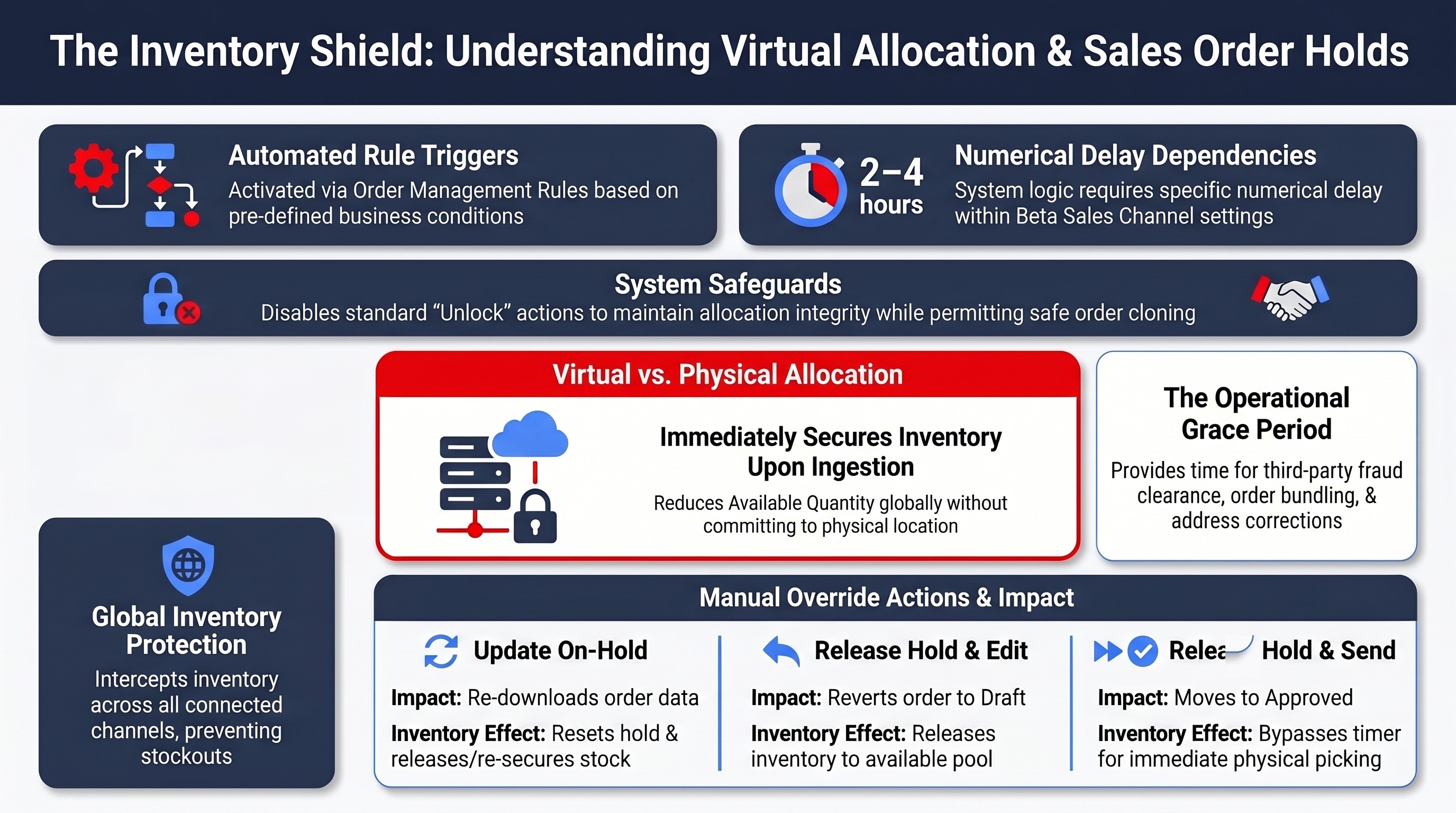
This mechanism protects inventory on a global network level across any connected Sales Channel. Specific use cases include preventing stockouts during high-volume sales events, waiting for asynchronous third-party fraud clearance before shipping, and allowing time for third-party bundling applications to compile and sync order lines. It also provides a valuable grace period for buyers to change their shipping addresses or cancel their orders before warehouse workers physically begin picking the items off the shelves.
On Hold Fundamentals
Triggering the Hold Action
This workflow is governed by the business logic defined in your Order Management Rules using the Hold Action.
If an order passes through the system without triggering a rule that contains the Hold Action, it bypasses Virtual Allocation entirely and is processed under the standard, immediate routing.
For detailed conceptual information and advanced configuration, refer to Rules Conditions and Actions Guide [Information].
Timer Mechanics and Configuration
When an order enters Virtual Allocation, the system calculates an internal release timer. The duration of this timer is determined strictly by the Delay setting configured within the origin Sales Channel.
It is crucial to understand that the function of this Delay setting changes fundamentally depending on whether the Virtual Allocation feature is active:
ROUTING CONFIGURATION | IS VIRTUAL ALLOCATION ENABLED? | DELAY SETTING BEHAVIOR | INVENTORY PROTECTION |
Standard Routing |  | Physically delays techOMS from downloading the order. Webhooks are temporarily paused, and recurring jobs alter their execution schedule. | The order remains in the sales channel during the delay, leaving inventory unprotected and vulnerable to overselling. |
Virtual Allocation Routing |  | Does not delay the order download. techOMS ingests the order immediately. The Delay value is extracted exclusively to calculate the internal timer. | The system immediately places the order On Hold and reduces the Available Quantity to protect the inventory globally while safely delaying the physical fulfillment. |
| For Virtual Allocation to function properly, the channel's Delay must be set to a specific numerical value (e.g., 1 hr, 2 hr). If the Delay is configured to None or Minimum, the system will completely ignore the hold logic. We strongly recommend configuring short, same-day delays (e.g., 2 to 4 hours) to maintain optimal order flow and avoid duplicate billing risks when synchronizing with external Sales Channels over long periods. | |
| | ||
For instructions on configuring this setting, refer to How to configure Automations for Sales/Fulfillment channels [Step-by-step guide].
Exceptions and Interventions
Manual Interventions and Overrides
Customer Service or Operations users do not have to wait passively for the timer to expire. They can intervene proactively via the Sales Order page using manual Update, Edit, Send, or Cancel actions.
For detailed conceptual information and advanced configuration, refer to How to Manage Sales Orders On Hold [Guide].
Order Cancellation and Deletion
Understanding the silent deletion synchronization logic is vitally important to prevent confusion when external storefront applications interact with techOMS.
If a user or an external application deletes an order directly in the external Sales Channel while it is currently sitting On Hold in techOMS, the system will automatically cancel and completely delete the order and its shipments. This safely releases the protected inventory back to the available pool.
| This specific deletion action causes the order to drop out of the standard queues entirely, and it will not be logged in the standard user-facing Sales Channel Logs. | |
| | ||
Was this article helpful?
That’s Great!
Thank you for your feedback
Sorry! We couldn't be helpful
Thank you for your feedback
Feedback sent
We appreciate your effort and will try to fix the article