Understanding where techOMS stands between your systems and the interactions that take place will help you see how each process works. This article explains how techOMS interacts with your connected systems, detailing the flow of information across different operational features.
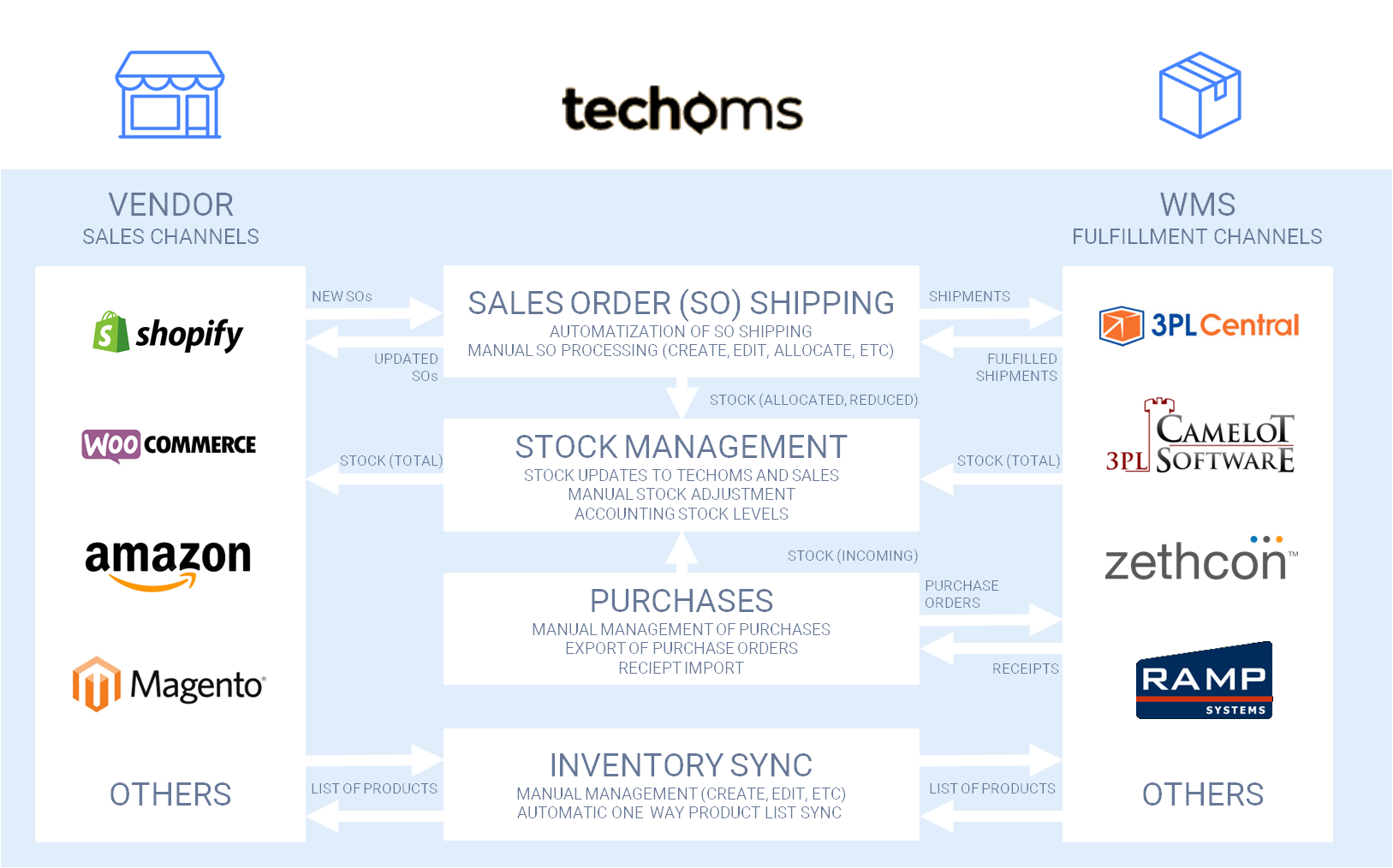
If you would like to verify the details of each subsystem, the following sections describe the core processes and operations.
Prefer listening? This podcast-style audio walks you through the article's key points.
 | AI-Assisted & Human-Reviewed: For general information only. Please double-check important details. | |
TABLE OF CONTENTS
Sales Order Shipping
This subsystem is responsible for the entire process of shipping Sales Orders, from retrieval to the moment it is shipped by a chosen Carrier Service. The subsystem maintains the following processes:
- Import of New Sales Orders: techOMS starts the process automatically when a Sales Order is placed in a Sales Channel, or it can be triggered manually via the techOMS UI. Sales Orders must meet validation conditions (e.g., no empty or unknown SKUs). Sales Orders created in techOMS have the status Approved by default. However, you may predefine a different status (e.g., Draft) for additional review based on the workflow.
- Sales Order Processing: This process allocates the Sales Order stock at one or multiple Physical Warehouses, creates shipments, and sends them to a respective Fulfillment Channel. techOMS uses the Physical Warehouses and Carrier Services predefined in the imported order, or defaults to your account settings. Depending on your configuration, this process starts automatically or manually.
- Import of Fulfilled Shipments: techOMS sends requests to the Fulfillment Channels with a defined periodicity to update shipment states resulting from fulfillment.
- Export of Updated Sales Orders: techOMS transmits the updated state of fulfilled Sales Orders back to the Sales Channels.
During the fulfilling process, Sales Orders may have one of the following statuses:
- Fulfilling: Indicates that none of the shipments related to the Sales Order are shipped.
- Partially Fulfilled: Indicates that at least one, but not all, shipments related to the Sales Order are shipped.
- Shipped: Indicates that all shipments related to the Sales Order are shipped and the fulfillment process is complete.
| The statuses listed above describe the general shipping process. For exact definitions of all supported statuses and their specific lifecycle, refer to Sales and Purchase Order Statuses Definitions [Information]. | |
| | ||
Stock Management
This subsystem manages and controls product quantities across your network of Physical Warehouses and unified Virtual Warehouses. It maintains the following processes:
- Stock Update from Fulfillment Channels: Retrieves the actual stock level (Stock on Hand) from your Physical Warehouses and updates the levels in techOMS. This triggers automatic near real-time recalculations for any associated Virtual Warehouses.
- Stock Adjustment: Allows you to manually increase or decrease product quantities in techOMS exclusively at the Physical Warehouse level, accounting for damaged or expired products.
- One-way Stock Update in Sales Channels: Updates the stock availability in your connected Sales Channels based on a predefined schedule or manual trigger.
- Accounting for Stock Level: techOMS accounts for inventory changes based on stock allocation during order processing, standard stock updates, manual adjustments, and purchasing receipts.
| To understand the specific inventory categories used in techOMS and how they are calculated, refer to Understanding Inventory Levels and Order Status Impact [Information]. To learn how physical locations can be logically grouped, review Understanding Virtual Warehouses and Virtual Inventory [Information]. | |
| | ||
Purchases
This subsystem manages and controls the processes related to your product supply. It maintains the following processes:
- Manual Management of Purchase Orders: You can create and manage Purchase Orders in the techOMS UI. These contain the products ordered from a Supplier to increase inventory stock at a specified Physical Warehouse. When you approve a Purchase Order, the included products are pending arrival into the facility.
- Export of Purchase Orders to Fulfillment Channels: techOMS exports approved Purchase Orders to your Physical Warehouses. When the products arrive, the warehouse receives them and prepares a Receipt.
- Import of Receipts from Fulfillment Channels: techOMS requests Receipts from the Fulfillment Channels to reflect the actual incoming amount of product received into the Physical Warehouse.
During the receiving process, Purchase Orders may have one of the following statuses:
- Receiving: Indicates that the products are not yet fully received by the Physical Warehouse.
- Received: Indicates that a Receipt corresponding to the Purchase Order has been retrieved by techOMS.
| For a detailed definition of Purchase Order statuses and how they affect the receiving process, refer to Sales and Purchase Order Statuses Definitions [Information]. | |
| | ||
Inventory Sync
This subsystem provides a tool for the synchronization of the product catalog (Products and Product Variants) across your ecosystem. The flow of this data is strictly governed by your Master Product Source configuration.
- Master Product Source Routing: Product data originates from a single designated system of truth (which can be techOMS, a specific Sales Channel, or a Fulfillment Channel). techOMS imports this data and propagates it outward to all other connected channels, ensuring a unified catalog.
- Manual Management: You can manually create and edit Products and Product Variants via the techOMS UI. However, if techOMS is not set as the Master Product Source, any manual changes made in techOMS will only propagate to non-master channels. They will not sync back to your master system and may be overwritten during the next import cycle.
| Inventory stock levels are handled separately by the Stock Management subsystem. To learn more about how product catalog data flows based on your central system of truth, refer to Understanding the techOMS Master Product Source [Information]. | |
| | ||
Was this article helpful?
That’s Great!
Thank you for your feedback
Sorry! We couldn't be helpful
Thank you for your feedback
Feedback sent
We appreciate your effort and will try to fix the article