To achieve your daily operations, you will need techOMS to synchronize information from the Fulfillment Channel.
As you do so, you will be able to pull Inventory Levels and Shipments.
 |
To automate this process, refer to: How to configure Automations for Sales/Fulfillment channels [Step-by-step guide].
|
| |
Verify that you are operating within the correct Vendor/Warehouse beforehand:
|

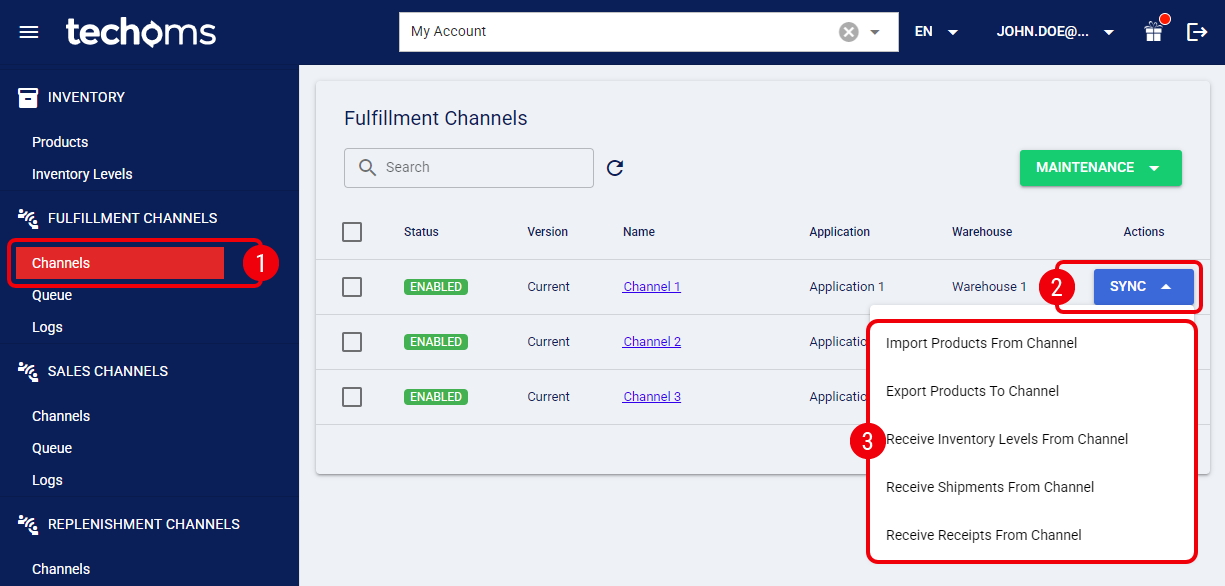
 | Click Channels from the left menu under the Fulfillment Channels section. |
 | Press Sync for the Fulfillment Channel you want to sync with. |
 | Select the synchronization operation to perform: |
- Import Products from Channel: Imports the Products from the connected Fulfillment Channel.
- Export Products to Channel: Exports the Products from techOMS to the connected Fulfillment Channel.
- Receive Inventory Levels from Channel: Receives Inventory levels from the connected Fulfillment Channel.
- Receive Shipments from Channel: Receives Shipments from the connected Fulfillment Channel.
If the Fulfillment Channel reports a shipped quantity of zero (0), techOMS automatically sets the shipment status to Cancelled. If this occurs unexpectedly, verify that the items were correctly fulfilled in the Fulfillment Channel.
- Receive Receipts from Channel: Receives Receipts from the connected Fulfillment Channel.
| |
techOMS automatically manages option availability based on:
These actions directly update your Inventory Levels and Order Statuses in techOMS. For more information, refer to:
|
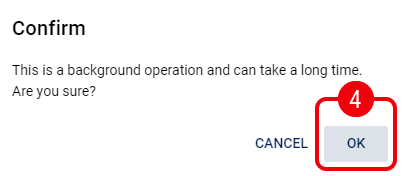
 | Click OK to begin the process. |
| |
Synchronization time may vary depending on the amount of data.
|
If successful, techOMS will show a notification in the top-right corner of the screen:

You can verify the status of the operation in the How to review Fulfillment Channels activity Logs [Step-by-step guide].
Was this article helpful?
That’s Great!
Thank you for your feedback
Sorry! We couldn't be helpful
Thank you for your feedback
Feedback sent
We appreciate your effort and will try to fix the article